Financial Accounting: From Excel to General Ledger

Does your accountant run books in 1C, but you don’t understand the real state of the business? Finances in Excel, exchange rate differences calculated manually? Don’t know if the business is profitable until you close the quarter? This is the classic gap: operational accounting in one place, financial accounting in another. There should be one General Ledger.

In this article, we’ll break down how to automate financial accounting — from the chart of accounts to period closing with exchange rate differences.

How is financial accounting different from management accounting?

These two concepts are often confused. In short:

  • Financial accounting — formal, by standards (GAAP or IFRS). General Ledger, chart of accounts, double-entry, balance sheet, income statement. Needed for tax authorities, audit, investors.
  • Management accounting — for the owner. Shows profitability of business lines, client profitability, manager effectiveness. Not regulated by standards.

In large companies, these are two separate systems — accounting in 1C or SAP plus custom BI dashboards. For small businesses, that separation is an unaffordable luxury. You need one system that does both. We wrote separately about the management accounting side.

Why won’t Excel replace a General Ledger?

Excel is a powerful calculator. But it’s not an accounting system. Here’s what it can’t do:

FunctionExcelERP with General Ledger
Double-entry (debit = credit)Manual, error-proneAutomatic on every document
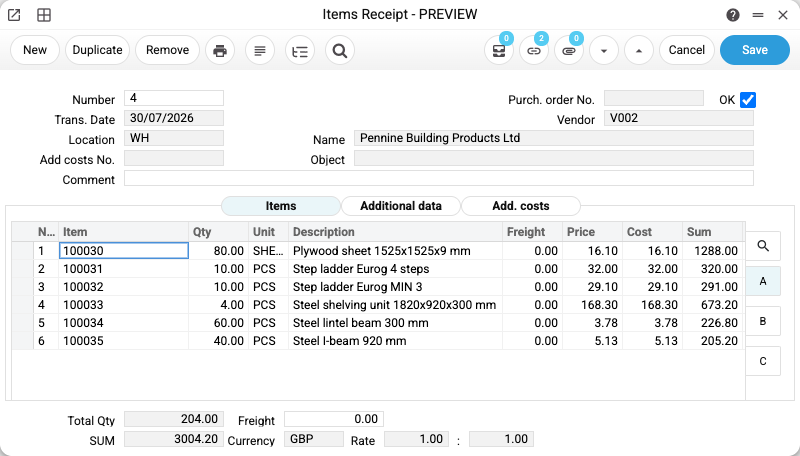
Entries from source documentsManual re-typingAutomatic from invoices, payments, stock
FX differencesFormulas breakAutomatic at central bank rates
Period closingMany hours manual3 clicks
VAT accountingSeparate spreadsheetAutomatic tax invoices
Audit trailAbsentImmutable change history
Multi-currencyRATE() formulasDual amounts in every line

As we discussed in the Excel vs ERP article — for small businesses, Excel works up to a point. For financial accounting, that point arrives quickly.

How does automated financial accounting work in ERPJS?

Key idea: every business operation automatically creates an accounting journal entry. You don’t need to re-type data from invoices into the General Ledger — the system does it.

Here’s what it looks like in practice:

OperationAutomatic journal entry
Issued invoice to customerDebit “Accounts Receivable” / Credit “Sales Revenue”
Customer paidDebit “Bank” / Credit “Accounts Receivable”
Received goods from supplierDebit “Inventory” / Credit “Accounts Payable”
Sold goodsDebit “Cost of Goods Sold” / Credit “Inventory”
Accrued payrollDebit “Payroll Expense” / Credit “Payroll Liabilities”
Accrued fixed asset depreciationDebit “Depreciation Expense” / Credit “Accumulated Depreciation”

The accountant no longer copies data from documents into the journal — they control the correctness of settings and review ready-made entries. If needed — they manually create specific entries (adjustments, reserves).

The chart of accounts is configured for your business: assets, liabilities, equity, revenue, expenses. ERPJS supports national, international, or any custom scheme.

How to close a financial period: 3 steps

Closing a month/quarter/year in Excel takes 2-3 days of accountant work. In ERPJS — 3 sequential steps via the “Closing Books” register:

Step 1: Revalue foreign currency balances. The system automatically recalculates balances in foreign currencies at the central bank rate on the closing date. The difference between old and new value hits the “FX Differences” account — gains or losses.

Step 2: Close revenue and expense accounts. Balances of all income and expense accounts transfer to the financial result account. You get the net profit or loss for the period.

Step 3: Distribute financial result. Net result transfers to the retained earnings account in equity.

All three operations are reversible — if you find an error, remove the flag, fix it, close again. No need to redo the entire Excel.

Multi-currency and FX differences

If you work with imports, exports, or have foreign currency accounts — FX differences can eat into margins. In Excel, they’re calculated manually with errors.

In ERPJS, multi-currency is built-in:

  • Dual amounts. Every journal line stores the amount in both base currency and foreign currency.
  • Auto rates. The system fetches current rates daily from central bank APIs. No manual updates.
  • Period-end revaluation. All foreign currency balances are automatically recalculated at the closing date rate. FX difference posts to P&L.
  • Currency purchase/sale. A separate register for exchange operations with automatic conversion rate calculation.

Budgeting: plan vs actual

Financial accounting shows what happened. Budgeting — what should happen. In an ERP, these two systems are integrated.

How it works:

1. Create a budget for year/quarter/month. By each account, by each department or project.

2. Actuals accumulate automatically. All entries in budget accounts add up on their own — from supplier invoices, payments, payroll.

3. The system shows variances. Plan 150K, actual 127K, remaining 23K. Or: plan 150K, actual 168K, overrun 18K.

For each department, you see how it fits within budget — before the quarter ends. You can react in time.

Analytical objects: accounting in 3 dimensions

The balance sheet shows “how much was spent.” But the director wants to know on what it was spent — by line, project, department.

In ERPJS, every journal entry can have analytical objects: department (Sales / Production / Admin), project (Site A / Site B), cost center (Office / Warehouse / Production floor).

Then you build reports by dimensions:

  • P&L by department — which brings more
  • Expenses by project — whether we hit margin
  • Balance by cost center — where excess spending is

This is the management side of financial accounting. Classical bookkeeping doesn’t give this — it reports one number for the whole company. Why this is critical — we showed in our article on real profit.

Which reports does the manager get?

ERPJS produces a full set of financial reports at the click of a button:

ReportWhat it showsFor whom
General LedgerAll entries for the periodAccountant, auditor
Trial BalanceOpening and closing balances, movementsAccountant, manager
Balance SheetAssets = liabilities + equityManager, investor
Income Statement (P&L)Revenue, expenses, net profitManager, owner
Analytical BalanceBalances by object (departments, projects)Manager
Account CorrespondenceWhich accounts clear against whichAccountant
Budget vs ActualVariances from planManager, CFO

All reports are built for any period — month, quarter, year, or custom dates. Excel export — for working with reports outside the system.

Who benefits from automated financial accounting?

ERPJS as a financial accounting system is useful for:

  • LLCs on general taxation — need full General Ledger, balance sheet, VAT
  • Importers/exporters — multi-currency and FX differences are critical
  • Manufacturing companies — cost accounting, calculation, shop-floor budgets. See our manufacturing article.
  • Companies with multiple legal entities — multi-company, consolidation
  • Project-based businesses — accounting by project, margin per project

For sole proprietors on simplified tax, full financial accounting is usually unnecessary — a basic cash book suffices. For such businesses, see simplified accounting.

Frequently asked questions

Will ERPJS replace our accountant?

No. An accountant is needed — for chart of accounts setup, entry verification, tax filings, communication with authorities. But they do more in less time. Typical optimization: instead of 3 accountants — 1 chief + assistant.

Can we import data from 1C or another system?

Yes. ERPJS supports Excel import for all directories (chart of accounts, counterparts) and balances. The chart of accounts can be copied from the old system, opening balances on transition date — via initial balance import.

Does ERPJS comply with local accounting law?

Yes. ERPJS supports the standard Ukrainian chart of accounts, tax invoices in the required format, export to the tax filing system. You can also configure an IFRS chart for companies reporting under international standards.

What if the accountant made an error and the entry is already in a closed period?

ERPJS has an “Operation Adjustment History” register — complete history of every journal entry. Correction can be done two ways: remove period closing, fix, close again; or create a reversing entry in the current period. Both options leave an audit trail.

How long does financial accounting implementation take?

Basic setup — 1-2 weeks: chart of accounts, VAT rates, opening balances, main settings. Full implementation with integration of all modules (sales, purchasing, inventory, payroll) — 1-3 months, depending on business size.

Try financial accounting in ERPJS

Free plan with no time limits. Chart of accounts, automatic journal entries, period closing, VAT — all included. Sign up →

How to Choose Inventory Management Software: 7 Criteria for Business Owners

Inventory management software becomes essential when Excel spreadsheets can no longer handle stock levels, mix-ups, and stocktaking. Research shows that businesses without automated inventory management lose up to 5% of goods due to manual tracking errors. Here are 7 criteria to help you choose the right software.

When does Excel stop working for inventory?

Excel breaks down when you have more than 200-300 SKUs and 30-50 daily transactions. Three main symptoms:

  • Mix-ups. The product exists but it’s the wrong one — positions, sizes, colors get confused. Customer ordered one thing, received another.
  • Unknown stock levels. To know how much is in stock, you need to physically count. The spreadsheet says 50 units, reality shows 37.
  • Stocktaking nightmare. Two days of manual counting, printing lists, reconciling with the spreadsheet. After stocktaking — another day fixing discrepancies.

If you recognized even one point — it’s time to look for software. More signs: 5 Signs Your Inventory Management Isn’t Working.

What 7 criteria matter when choosing inventory software?

Not all software is equal. Here’s what to pay attention to:

1. Real-time stock levels

Basic requirement — see current stock for every product at any moment. Not “as of yesterday”, but right now. In ERPJS, stock levels update instantly with every operation — sale, purchase, or write-off.

2. Mobile stocktaking

Stocktaking should take hours, not days. Look for software with a mobile scanner — scan the barcode, the system compares with records, discrepancies are visible immediately. In ERPJS, stocktaking a warehouse with 500 items takes 2-3 hours instead of 2 days.

3. Serial numbers and batches

If your products have serial numbers (electronics, equipment) or expiration dates (food, medicine) — the software must support this. Without it, you can’t track a specific unit.

4. Receipts and shipments with documents

Every product movement must be documented: receiving note, shipping note, write-off act. This is the foundation for accounting and tax reporting.

5. Financial integration

Inventory without finances is half the picture. The software should calculate product cost, margin on each sale, total inventory value. In ERPJS, inventory management is linked to management accounting — P&L, balance sheet, and cash flow account for inventory operations automatically.

6. Multi-warehouse

If you have more than one warehouse (or warehouse + store + production) — the software must support transfers between locations and show stock per warehouse.

7. Cloud or on-premise?

Cloud software — access from any device, no installation, automatic updates. On-premise — full data control, works offline. ERPJS supports both: cloud for convenience, on-premise for those who want to control their data.

Comparing types of inventory management software

There are three main types of solutions on the market. Here’s a comparison for a typical store with 500-1000 products:

CriteriaExcelLegacy (1C/SAP)Cloud ERP (ERPJS)
Real-time stockNo — manual updatesYesYes
Mobile stocktakingNoRequires add-onYes, from phone
Cost & marginManual formulasYes, complex setupAutomatic
Mobile accessInconvenientNo (or via RDP)Yes, browser
CostFreeLicense + implementationFrom free
Implementation time01-3 months1-2 weeks
Open sourcePartiallyYes (ERPJS)

More on transitioning from Excel: Excel vs ERP: When Spreadsheets Stop Working.

What to check when testing?

Before choosing software — test it with real data. Three tips:

  1. Upload your products. Check if CSV/Excel import works. If loading 500 products takes more than an hour — that’s a problem.
  2. Try typical operations. Receiving goods, making a sale, processing a return, transferring between warehouses. How many clicks? Is it intuitive?
  3. Do a test stocktake. This is the best test — if stocktaking is convenient, everything else will work.

How does inventory management work in ERPJS?

ERPJS inventory management covers all 7 criteria from this article. Real-time stock, mobile stocktaking, serial numbers, documents, financial integration, multi-warehouse — all in one system.

The main advantage — inventory is integrated with sales, purchasing, and financial accounting. Sold a product — stock updated, cost deducted, revenue recorded. No need to duplicate data between different programs.

Free plan with no time limits — enough for testing and getting started.

Try ERPJS for free

Upload your products, do a test stocktake, check the reports. No time limits. Sign up →

FAQ

What’s the best inventory management software for small business?

For small business, a cloud ERP with a free plan is optimal: no installation needed, access from any device, minimal implementation time. ERPJS is one such option with open-source business logic.

Can you do inventory management for free?

Yes. ERPJS has a free plan with no time limits: stock tracking, receiving/shipping, stocktaking, serial numbers. Limits — 1 user and 512 MB storage.

How long does it take to implement inventory management software?

For cloud ERP — 1-2 weeks: uploading products (day 1-2), warehouse setup (day 3-4), test stocktake (day 5). For SAP or legacy systems — 1 to 6 months.

Do I need an IT specialist to use the software?

For the cloud version — no. ERPJS runs in a browser, no installation needed. For the on-premise version, basic server skills or a partner’s help is needed.

What’s better — legacy software or cloud ERP for inventory?

Legacy systems are powerful but complex: need a specialist, expensive support, no browser access. Cloud ERP is simpler, more affordable, works from any device. For small businesses under 50 employees, cloud ERP is usually the better choice.

Small Business Accounting: Where to Start and How to Stay Organized

Small business accounting in ERPJS starts with three steps: products in stock, cash flow, and client database. First results — in 2 weeks. No accountant needed, no Excel — just a system that works for you.

80% of small businesses track their accounting “in their head” or in Excel. While you have 10-20 transactions a day, it works. But as the business grows, chaos begins: products are in stock but can’t be found, money comes in but profit is unclear, customers return but you don’t remember their history.

Why do small businesses avoid proper accounting?

Three main reasons: fear of complexity, the belief “we’re still too small for ERP,” and the habit of using Excel. In reality, each of these reasons is a mistake that costs money.

“It’s too complex” — modern accounting systems don’t require a bookkeeping degree. In ERPJS, basic setup takes 1-2 hours: add products, set prices, connect your cash register.

“We’re still too small” — small businesses actually suffer the most from lack of accounting. Large businesses have a CFO and accounting department. Small businesses have an owner who simultaneously sells, purchases, and counts money. Without a system, they lose control first.

“Excel is enough” — up to a point. When you have 500+ products, 3+ employees, and 50+ transactions per day — Excel stops working. Formulas break, files get lost, data doesn’t sync.

What 3 things should you track first?

Don’t try to automate everything at once. Start with three basics — this is enough for 90% of small businesses.

1. Products and services

What’s in stock, what it costs, what price you sell at. This is the foundation — without it, you don’t know your stock levels or margins. ERPJS inventory management includes receiving, shipping, stocktaking, and serial numbers. Adding 100 products takes 30-40 minutes.

2. Money (cash + bank)

Where money came from and where it went. This is Cash Flow — the most important report for a small business. If you don’t know your Cash Flow, you’re not managing the business — the business is managing you. In ERPJS, cash movement is recorded automatically with every payment.

3. Clients

Who buys, how often, for how much. Even a simple client database gives insight: who are your best customers, who hasn’t returned in a while, who needs a reminder. In ERPJS, the CRM module is built-in — no separate software needed.

How to start accounting in 2 weeks?

A step-by-step plan, tested with dozens of small businesses. No need to dedicate entire days — 1-2 hours per day is enough.

Week 1 — products and prices:

  1. Day 1-2: Register in ERPJS, create your company, set up warehouse
  2. Day 3-4: Add products/services (name, purchase price, selling price)
  3. Day 5: Run initial stocktaking (enter current quantities)

Week 2 — finances and reports:

  1. Day 1-2: Set up cash register and bank account
  2. Day 3-4: Start entering transactions (sales, purchases, payments)
  3. Day 5: Check your first report — Cash Flow and stock levels

After 2 weeks, you have a working system: real-time stock visibility, clear cash flow picture, and a client database.

How is ERP different from Excel for small business?

An ERP system automates what you’d do manually in Excel. Here’s a concrete comparison for a typical store with 500 products:

TaskExcelERPJS
Check product stockFind file → find row (2-5 min)Search by name (5 sec)
Process a saleManual: deduct from stock + record payment (3-5 min)One document: stock + cash auto (30 sec)
Monthly reportBuild formulas, verify (2-4 hrs)One click (instant)
Find client debtSearch through files (5-10 min)Client card (3 sec)
StocktakingPrint list → manual count → enter (1-2 days)Mobile scanner → reconcile (2-3 hrs)

More on transitioning: Excel vs ERP: When Spreadsheets Stop Working

How much does small business accounting cost?

From $0 to €50 per month — depending on scale. ERPJS has a free plan with no time limits: 1 user, 512 MB storage. This is enough for a sole proprietor or micro-business with 1-2 employees.

When to upgrade to paid? When you need:

  • 3+ users (salesperson, warehouse worker, bookkeeper) — from €30/month
  • More storage for product photos and documents
  • Management reporting: P&L, balance sheet, analytics by business unit

Frequently Asked Questions

Do I need an accountant to use ERPJS?

No. ERPJS is management accounting for the business owner, not statutory bookkeeping. The interface is intuitive without special education. Basic setup takes 1-2 hours.

How long does it take to switch from Excel to ERPJS?

2 weeks at 1-2 hours per day. First week — products and prices, second week — finances. Import from Excel is possible via CSV.

Is ERPJS suitable for an online store?

Yes. ERPJS includes inventory management, CRM, financial accounting, and a B2B module. For online stores, especially useful: stock tracking, automatic write-off on sale, order management.

What’s better for small business — Excel or ERP?

Excel works up to 50-100 transactions per month with 1 user. Beyond that threshold, ERP saves 3-5 hours per week on routine operations: reports, lookups, reconciliations.

Can I do accounting from my phone?

Yes, ERPJS works in the browser on any device. A salesperson can process a sale from their phone, and the owner can check reports from a tablet.

Try ERPJS for free

Free plan with no time limits. Set up your accounting in 2 weeks — no accountant, no Excel. Sign up →

Management Accounting Automation: When Excel Falls Short

Most business owners track management accounting in Excel. First it’s one spreadsheet, then ten, then chaos: broken formulas, file versions, and manual data copying. Sound familiar?

Automating management accounting isn’t about million-dollar ERP implementations. It’s about seeing the real picture of your business without spending hours in spreadsheets every day.

What is management accounting and why automate it?

Management accounting is a system for collecting and analyzing financial data to make business decisions. Unlike statutory accounting (required by law), management accounting is for you.

Three key reports:

  • P&L (Profit & Loss) — how much you earned, how much you spent, what’s the profit
  • Cash Flow — where money came from, where it went
  • Balance Sheet — what the company owns, what it owes

When these reports are prepared manually, they’re always late and often contain errors.

5 signs Excel is no longer enough

  1. Reports take a week after month-end close — decisions are based on outdated data
  2. Formulas break — someone accidentally changed a formula, and numbers don’t add up
  3. Multiple file versions — the accountant has one set of numbers, the CFO has another
  4. Manual data entry — data from the bank, from legacy systems, from CRM is copied by hand
  5. No drill-down analytics — can’t quickly check profitability by client, project, or product

What does automation give you?

Real-time reports

P&L, Cash Flow, Balance Sheet — generated automatically from entered transactions. Not in a week — now.

Single source of truth

All data in one system. The accountant, CFO, and owner see the same numbers.

Multi-dimensional analytics

Profitability by client, project, or business unit — without manual work.

Control points

Cash reconciliation, inventory checks, counterparty reconciliation — the system reminds and helps you stay in control.

How to start automating?

You don’t need to automate everything at once. Start with three steps:

  1. Define your chart of accounts — which accounts do you need (cash, bank, inventory, receivables, payables)
  2. Start entering transactions — at minimum, cash movements. Even this alone gives you a Cash Flow picture
  3. Set up reports — P&L and Balance Sheet. Verify: balance = financial result minus withdrawals

The key rule: identical events must be recorded identically. This is your accounting policy — the foundation of reliable accounting.

Why not QuickBooks or SAP?

For small and medium businesses, three things matter:

  • Simplicity — no specialist needed for daily operations
  • Price — free plan to start, no hidden fees
  • Accessibility — runs in the browser, no installation, access from any device

ERPJS is a management accounting system that combines finance, inventory, CRM, and manufacturing in one solution. Free plan with no time limits.

FAQ

Can you do management accounting in Excel?

Yes, but only up to a point. When you have more than 50-100 transactions per month, Excel starts creating more problems than it solves: formula errors, file versioning issues, and no real-time analytics.

How much does management accounting automation cost?

From free (ERPJS free plan) to millions (SAP, Oracle). For small businesses, starting with a free solution and scaling as needed is optimal.

What’s the difference between management and statutory accounting?

Statutory accounting is for tax reporting as required by law. Management accounting is for business decisions: what’s your margin, cash flow, asset balance. These two systems can and should exist in parallel.

5 Signs Your Inventory Management Is Broken

You don’t know exactly how much stock you have in your warehouse. You know approximately. And that “approximately” costs your business money every month — on unnecessary purchases, lost sales, and inventory that vanished without a trace.

If you recognise yourself in at least three of the five signs below, it’s time to change your approach to inventory management. Inventory management is a system for tracking the movement of goods and materials: receiving, transfers, write-offs, and shipments. Without it, your business operates blind.

Why do Excel and notebooks fail at warehouse management?

Excel works for tracking 20-30 items when one person is responsible. As soon as you add a second warehouse worker, two shifts, or 100+ SKUs, problems begin. Someone forgot to enter data, someone overwrote a formula, someone is working with yesterday’s version of the file.

Studies show that manual inventory tracking leads to 8-15% discrepancies between actual stock and records. For a business turning over 500,000 UAH/month, that’s 40,000-75,000 UAH in “invisible” losses.

Key problems with Excel-based warehouse accounting:

  • No change history — who changed what and when is unknown
  • Impossible for two people to work simultaneously
  • No automatic stock recalculation after each operation
  • No link to documents (delivery notes, acts)

Read more about comparing approaches in Excel vs ERP: When Spreadsheets Stop Working.

Sign 1 — You don’t know your real stock levels right now?

If answering “how much of product X do we have in stock?” requires physically going to count — that’s the first and most obvious sign of a problem. In proper inventory management, the answer takes 5 seconds: open the system, see the number.

When stock levels are unknown in real time, businesses face two consequences:

  • Unnecessary purchases — buying what you already have because you can’t see current stock
  • Lost sales — promising a customer a product that’s actually out of stock

In ERPJS, stock levels update automatically after every operation — receiving, dispatch, transfer. No manual counting needed.

Sign 2 — Does stocktaking bring surprises?

A difference of more than 5% between “on paper” and “in reality” after stocktaking is a serious red flag. It means errors have been accumulating for months without anyone noticing. Often it’s theft, mix-ups, or simply unrecorded write-offs.

Regular stocktaking isn’t just “count everything once a year.” It’s a control tool that should run monthly or even weekly for critical items.

In ERPJS, stocktaking is a separate document: you enter actual quantities, the system compares them with recorded figures and generates a discrepancy report. The entire process takes an hour instead of a full day.

Sign 3 — Has product mix-up become routine?

Shipping the wrong product to a customer because items got confused in the warehouse isn’t just a mistake — it’s lost trust and direct financial losses: returns, re-shipping, compensation. If this happens more than once per 100 shipments, the problem is systemic.

The root cause is lack of clear product identification. When a warehouse worker relies on memory instead of scanning a barcode or checking an SKU in the system, mistakes are inevitable.

An accounting system solves this at the process level: every shipment is linked to specific items with SKUs, serial numbers, and specifications.

Sign 4 — You don’t know the true cost of your products?

Cost isn’t just the purchase price. It’s procurement + shipping + customs + storage + handling. If you calculate profit as “sold for 1000, bought for 600, earned 400,” you’re likely missing 30-40% of real expenses. This means your management accounting is showing an illusion of profit.

Automatic cost calculation in ERPJS accounts for all components: from purchase price to logistics costs. You see the real margin on each product and can make decisions based on facts, not intuition.

Sign 5 — Write-offs and returns go unrecorded?

Stock disappearing from the warehouse without a document is a black hole in your accounting. Broken, expired, returned by a customer, used internally — if it’s not recorded, discrepancies at stocktaking are guaranteed. And you won’t be able to explain to auditors where the goods went.

Every warehouse operation must be documented: write-off act, return act, transfer act. In an inventory management system, this takes a minute — select the operation type, specify items, confirm.

What to do if 3+ signs match?

If you recognised yourself in three or more points, it’s time to move from manual tracking to a system. Here’s a concrete 2-week plan:

  1. Week 1: Stocktaking. Count everything in your warehouse. Record actual quantities. This is your “point zero.”
  2. Week 1: Enter stock levels. Upload quantities into the accounting system. In ERPJS, you can import from an Excel file.
  3. Week 2: New rules. Every warehouse operation goes through the system. Receiving, shipping, write-offs, returns — everything is recorded.
  4. Week 2: Verification. At the end of the week, compare system quantities with reality. Discrepancy should be minimal.

ERPJS lets you start for free: inventory management, stocktaking, product tracking — all available on the free plan.

Frequently Asked Questions

Can you manage inventory in Excel?

You can, but only with a small number of items (up to 50) and one person responsible. With 100+ SKUs or multiple warehouse staff, Excel becomes a source of errors: no access control, no change history, and no automatic stock recalculation.

How long does it take to switch to an inventory management system?

The basic transition takes 1-2 weeks: a day for stocktaking, a day to enter stock into the system, and a week to adjust to the new process. In ERPJS, you can import stock levels from an Excel file in minutes.

What is management inventory accounting?

It’s accounting that gives the owner a real picture of goods movement: real-time stock levels, cost per item, turnover rate, dead stock. Unlike financial accounting, management accounting is aimed at business decision-making.

Does a small business need inventory management?

Yes, if you have more than 50 product or material SKUs. Even a small business loses 5-15% of inventory value due to inaccurate tracking — money that can be saved with a simple accounting system.

What’s the difference between financial and management inventory accounting?

Financial accounting is maintained for tax reporting according to established rules. Management accounting is for the business owner: real cost, margins, turnover speed. ERPJS provides management accounting that helps make decisions.

Get your warehouse in order
ERPJS is a management accounting system with a complete inventory module: real-time stock levels, stocktaking, cost tracking, goods movement. Free plan with no time limits.

Try it free

Profit or Illusion? How to Know What Your Business Really Earns

There’s money in the account. Orders keep coming. Clients are paying. Everything seems fine. But at the end of the month, there’s not enough for salaries, rent, or restocking. Sound familiar?

Most small business owners don’t know their real profit. Not because they’re lazy, but because they confuse revenue with profit, don’t account for all expenses, or simply lack a convenient tool for tracking. In this article, we’ll break down 5 common mistakes and show how to fix them.

5 Mistakes That Hide Your Real Profit

1. Confusing revenue with profit

The most common mistake. You received 50,000 this month — and it feels like the business earned 50,000. But that’s revenue, not profit. From that amount, you need to subtract the cost of goods, salaries, rent, taxes, logistics, advertising, and utilities.

Real profit is often 5–10 times less than revenue. Sometimes it’s even negative — while there’s still cash in the account.

2. Not fully accounting for cost of goods

Bought an item for 10, sold it for 20 — seems like you earned 10. But did you account for shipping to your warehouse? Storage? Packaging? The manager’s time processing the order? Returns and defects?

Without full cost accounting, you’re seeing a “gross” margin that could be 2–3 times higher than the real one.

3. Forgetting fixed expenses

Rent, salaries, software subscriptions, accountant fees, bank charges — these costs exist every month, regardless of sales. When you estimate profit “by feel,” it’s easy to undercount or forget them.

Then you wonder: sales are up, but there’s less money. Because fixed costs ate up all the growth.

4. Mixing business and personal money

A classic small business problem: the owner takes cash from the register for personal needs, then puts personal money back into the business. After a month, it’s impossible to tell how much the business earned versus how much was spent personally.

This isn’t a moral issue — it’s an accounting issue. Without clear separation, you’ll never see the real picture.

5. Checking profit once a year (not monthly)

Some owners only learn their profit when the accountant files the annual report. But by then it’s too late to change anything — the year has passed, mistakes were made, money was spent.

Management accounting isn’t an annual tax report. It’s monthly (ideally weekly) reporting for yourself.

Why This Is Dangerous

So what if you don’t know your exact profit? Problems start when decisions are based on inaccurate data:

  • You hire a new employee because “sales are growing” — but the margin doesn’t actually cover their salary
  • You open a second location because “the first one is profitable” — but it’s barely breaking even
  • You offer discounts because “we can afford it” — but cost of goods has already eaten the margin
  • Cash flow gap — client payments arrive in 30 days, but salaries are due tomorrow

Without clear numbers, every business decision is a gamble.

What Is Management Accounting and Why You Need It

Management accounting is a system of tracking for the owner, not for the tax office. Tax accounting answers “how much tax to pay.” Management accounting answers “how much am I earning and where is the money going.”

Sounds complex? It’s really not. At a basic level, it’s three reports:

ReportWhat it showsIn plain terms
P&L (Profit & Loss)Revenue minus expenses for a periodHow much you earned/lost this month
Cash FlowWhere money came from and where it wentWhy there’s cash but no profit (or vice versa)
Balance SheetWhat the business owns and owesThe big picture on a specific date

You don’t need to be an accountant to read these reports. You just need a system that collects data automatically.

How to Get Your Finances in Order in 4 Steps

Step 1. Define what you’re tracking

Before counting anything, you need to understand — what exactly to count. Products? Services? Projects? Orders? This determines your accounting structure. Start with understanding what your business needs to track — it will save time and frustration. Also consider what exactly your business should track — this determines your entire accounting structure.

Step 2. Consolidate all expenses in one place

Rent, salaries, purchases, advertising, logistics — everything should go into one system. Not three different Excel files, not a notebook, not “in your head.” One system — one source of truth.

Tip: start with fixed expenses (they don’t change monthly) and add variable costs gradually.

Step 3. Set up regular reporting

A P&L report once a month is the minimum. Ideally — every week. It shouldn’t take an hour: if data is entered consistently, the report generates in seconds.

The key: reports should be generated automatically from already-entered data, not assembled manually from multiple sources.

Step 4. Automate the routine

Manually entering every payment, every transaction, every inventory movement — that’s a guarantee of errors and lost motivation. Automated financial accounting frees your time for decisions, not data entry.

Automation isn’t “someday later.” It’s what makes accounting sustainable. Without it, even the best system gets abandoned within a month.

Why Excel Won’t Help Here

We covered this in detail in our previous article. In short: Excel has no business logic, doesn’t link operations together, doesn’t generate reports automatically, and doesn’t scale. For basic calculations — yes. For management accounting — no.

Conclusion

Not knowing your real profit isn’t something to be ashamed of. Most small businesses start without proper accounting, and for a while that works. Problems begin when the business grows but management stays at the “seems fine” level.

Management accounting isn’t complex science for large corporations. It’s a simple tool that answers the most important question: how much am I really earning?

Frequently Asked Questions

What is the difference between revenue and profit?

Revenue is the total amount of money received. Profit is what remains after subtracting all expenses: cost of goods, salaries, rent, taxes, and logistics. Real profit is often 5–10 times less than revenue.

How often should I track profit?

Monthly at minimum, ideally weekly. If data is entered consistently, a P&L report generates automatically in seconds. Checking profit once a year is too late for making informed decisions.

What is management accounting?

Management accounting is a tracking system for business owners, not for the tax office. It answers the question “how much am I earning and where is the money going.” It’s based on three reports: P&L, Cash Flow, and Balance Sheet.

What reports do I need to understand my profit?

Three core reports: P&L (Profit & Loss — how much you earned this month), Cash Flow (where money came from and went), and Balance Sheet (what the business owns and owes on a specific date).

Can I do management accounting in Excel?

For basic calculations — yes. But Excel lacks business logic, doesn’t link operations together, and doesn’t generate reports automatically. In ERPJS, reports are built automatically from already-entered data — no manual assembly from multiple files.

Ready to see the real picture?
Try ERPJS for free — set up basic accounting and see your real profit within the first month.
Try for free →

Excel vs ERP: When Spreadsheets Stop Working

Sound familiar? Your business is growing, Excel files keep multiplying, formulas break, and data across different spreadsheets never quite matches up. Your accountant spends half a day just to compile a monthly report. And you, the owner, can’t quickly answer a simple question — how much did we actually earn this month?

Excel is a great tool. But it was built for calculations, not for running a business. When the volume of operations grows, spreadsheets turn from a helper into a problem. In this article, we’ll look at when that moment comes — and what to do about it.

7 Signs That Excel Is No Longer Enough

If you recognize at least three of these — it’s time to think about a change.

1. Data diverges across files

Every manager has their own copy of the spreadsheet. Inventory in one file, sales in another, finances in a third. Totals never match on the first try, and every time you need a manual reconciliation.

2. Monthly reports take 2+ days to compile

Manual copying from multiple files, checking formulas, fixing errors. What should take an hour stretches into days. And by the time the report is ready — the data is already outdated.

3. Inventory doesn’t match reality

Sold an item — forgot to subtract from stock. Returned an item — didn’t add it back. Ran an inventory check — discrepancies in the thousands. Without automated inventory management, this problem only grows month after month.

4. You can’t see real profitability

Revenue is not profit. Cash in the account is not profit. But in Excel, these concepts often get mixed up. To see the real picture, you need management accounting — not another pivot table.

5. The file has become “sacred” — nobody dares touch it

Complex formulas, macros, cross-references between sheets. One person knows how it works. If they’re on vacation or quit — nobody understands what’s going on.

6. No change history

Someone deleted a row — and nobody knows who or when. No versioning, no audit trail. If an error is discovered a month later — finding its source is nearly impossible.

7. Can’t work simultaneously

One employee opens the file — another waits or creates a copy. Then copies multiply, and it’s unclear which version is current. Google Sheets partially solves this, but creates new problems.

What Excel Can and Can’t Do

Let’s be fair — Excel has its strengths. Problems begin when you demand things it wasn’t designed for.

CriterionExcelERP System
Getting startedInstant, freeInitial setup required
Simple calculationsPerfectOverkill
1 userFineFine
5+ usersVersion chaosSingle database
Inventory trackingManual, error-proneAutomated
Financial overviewSeparate unlinked sheetsEnd-to-end analytics
ScalingDead endAdd modules as needed
Data securityFile on someone’s desktopRoles, permissions, backups

Excel is a calculation tool. ERP is a business management system. You don’t need to replace Excel entirely — you need to understand which processes have outgrown it.

“What About Google Sheets?”

Fair question. Google Sheets solves the collaboration problem — multiple people can edit simultaneously. But it doesn’t solve the core issues:

  • No business logic — the chain “order → inventory → payment → profit” doesn’t work automatically
  • No automatic transactions — every operation must be entered manually
  • No record-level access control — it’s either access to everything or nothing
  • Same formula and scaling problems remain

Google Sheets is a more modern Excel, but not a replacement for an accounting system.

What the Transition to ERP Looks Like

The biggest fear: “we’ll drop everything and be in chaos for a month.” In reality, the transition is a gradual process.

Step 1. Audit

What’s currently tracked in Excel? Which processes are critical? What hurts the most? Usually it’s either financial accounting, inventory, or payment tracking. Start with understanding what your business actually needs.

Step 2. Pilot

Start with one process. For example, only financial accounting or only inventory. Don’t try to migrate everything at once.

Step 3. Data migration

Import your reference data — products, customers, balances. Most ERP systems have Excel import tools. Your spreadsheets won’t disappear — they become the source for migration.

Step 4. Expansion

Add new modules as you get comfortable. First accounting, then inventory, then orders. No need to buy everything upfront.

Realistic timeline for basic accounting: 2–4 weeks. Not months, not years.

What to Look for When Choosing an ERP

The ERP market is large. Here are 5 criteria worth checking before you choose:

1. Accounting as the core, not an add-on

Many systems position themselves as CRM with “bonus” accounting. But if your main problem is financial chaos and inventory discrepancies, you need a system where accounting is the foundation — not a secondary feature.

2. Cloud or on-premise — your choice

Not every business is ready to store data on someone else’s servers. Ideally, the system offers both options: a cloud solution for a quick start and the ability to move to your own server when you’re ready.

3. Open source

If the vendor doubles the price next year — what will you do? If you need a custom modification — how much will it cost? Open-source business logic means you’re not locked into a single vendor.

4. Affordable start

It’s great when you can start for free or at a minimal cost. This gives you time to learn the system without financial risk. “$500/month minimum” for a small business isn’t a starting point — it’s a barrier.

5. Support and partners

Being left alone with a new system is a recipe for failure. It’s important to have support, documentation, and ideally a partner network that can help with implementation.

Conclusion

Excel was the right first step. Every business starts with spreadsheets. But as your business grows, your tools need to grow with it.

If you recognized three or more of the 7 signs — it doesn’t mean you’re doing something wrong. It means your business has outgrown its current tools and is ready for the next level.

Frequently Asked Questions

When should I switch from Excel to ERP?

If you recognize 3 or more of the 7 signs (data diverges across files, reports take days, inventory doesn’t match, no change history, etc.) — your business has outgrown Excel. Basic accounting setup takes 2–4 weeks.

How long does the transition from Excel to ERP take?

Basic accounting can be up and running in 2–4 weeks. The process is gradual: start with one process (e.g., finances), then add inventory, then orders. No need to migrate everything at once.

Can Google Sheets replace an ERP system?

No. Google Sheets only solves the collaboration problem. It lacks business logic, automatic transactions, and record-level access control. It’s a more modern Excel, but not an accounting system.

How much does ERP cost for a small business?

With ERPJS, you can start for free. This gives you time to learn the system without financial risk. Paid plans are available when your business is ready for expanded functionality.

Will I lose my Excel data when switching?

No. ERP systems include Excel import tools. Your spreadsheets become the source for migration — products, customers, and balances are transferred to the new system.

Ready to see the difference?
Try ERPJS for free — migrate one process from Excel and compare in a week.
Try for free →