Management Accounting Template for Excel
This free management accounting template for Excel answers the three questions every owner asks: how much the business earned this month, where the money went, and what the business has today. You enter each payment on one row, and the profit, cash and balance reports calculate themselves. The template is made for a small shop, a service business or a workshop. It works in Excel and LibreOffice, and you do not need to sign up.
Download the template (Excel) →
What is in the management accounting template?
Six sheets: you fill in two, three calculate themselves, and one is a short guide.
How much we earned
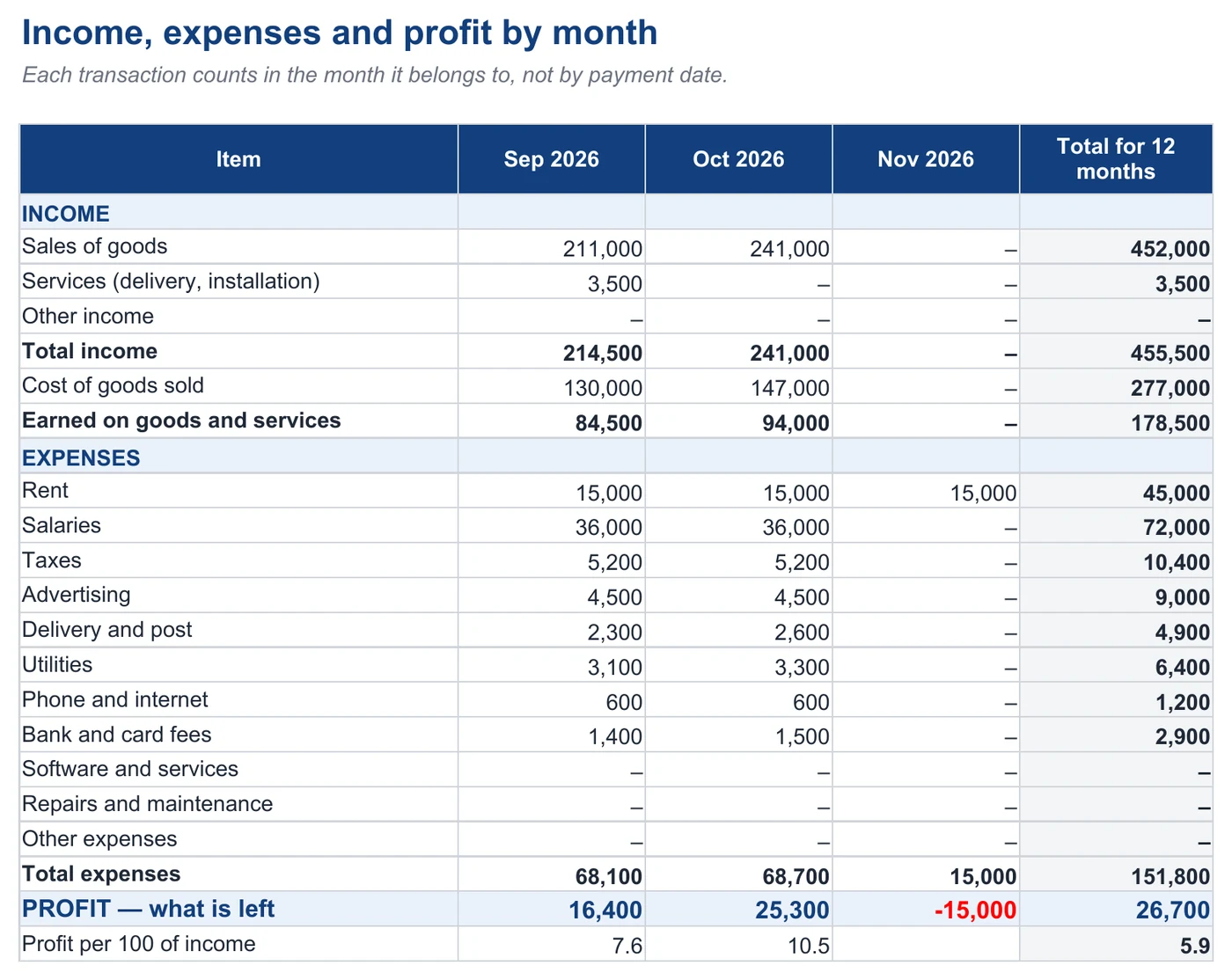
The Profit sheet: income, cost of goods sold, expenses and profit for every month of the year. Each transaction counts in the month it belongs to, not the month you paid.
Where the money went
The Cash sheet: how much came in and went out during the month, what exactly the money was spent on, and how much is left in each account — cash till, card or bank.
What we own and owe
The What we own sheet: money, stock, what customers owe you and what you owe at the end of the month. The difference is your equity — the part of the business that belongs to you.
You fill in the yellow cells; the white ones are formulas. Income and expense categories are picked from a list, so a typo cannot make an amount disappear from the reports. The file comes with an example — a small shop in September and October — so you can see what the finished reports look like right away. Delete the example before you start.
How do you keep the books in the template?
- Settings. Enter the month you start from, your accounts (cash, bank, card) with their balances on the first day, and the value of your stock.
- Categories. Rename the income and expense categories to fit your business, or add new ones in the empty rows.
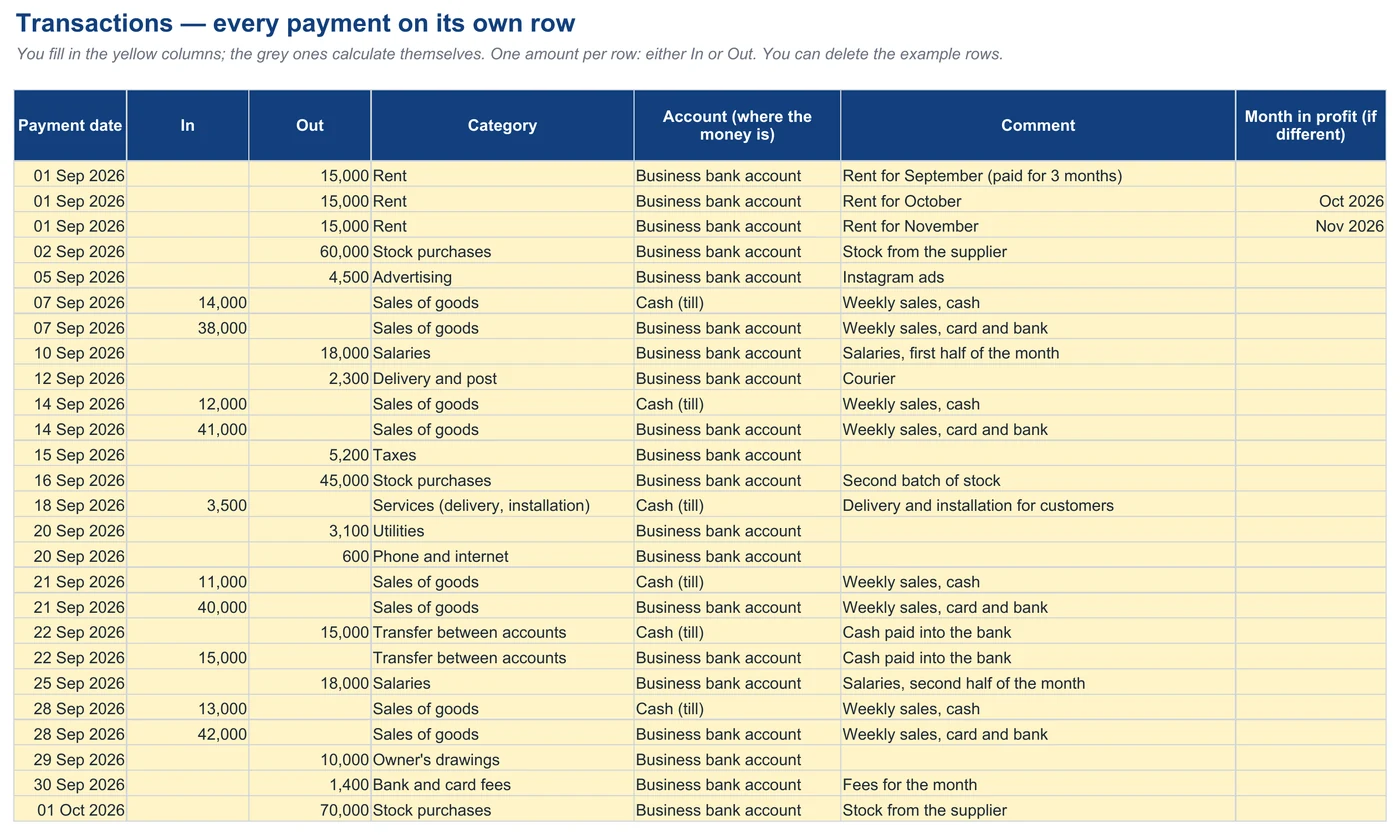
- Transactions. Enter every payment on its own row: the date, the amount under In or Out, the category and the account.
- Once a month. Enter the value of your stock, what customers owe you and what you owe.
- Results. Open Profit, Cash and What we own — everything is already calculated there.
Download the template (Excel) →
Why is there profit but no money?
Because profit and cash are counted differently. Profit is how much the business earned: income minus the cost of what you sold and the expenses that belong to this month. Cash is how much money you actually have in your accounts.
In the template’s example, the shop made 16,400 of profit in September, yet its accounts grew by only 1,400 over the month. Here is where the difference went:
- Rent was paid three months in advance. 45,000 left the account in September, but only a third of it — 15,000 — counts as a September expense. Cash is 30,000 behind profit.
- The shop bought 105,000 of stock but sold 130,000 worth at cost: some of what it sold was already on the shelves. Here cash is 25,000 ahead of profit.
- The owner took out 10,000. That does not change profit, but there is less cash.
In total: 16,400 − 30,000 + 25,000 − 10,000 = 1,400. The template shows both sides — profit on the Profit sheet and cash on the Cash sheet. Why turnover and profit are different things is explained in detail in Profit or illusion?
A payment made in advance goes into the template as several rows — one for each month it covers. ERPJS has prepaid expense accounting for payments like this.
How do you work out the cost of goods without inventory software?
From your closing stock. Once a month, count your stock and value it at purchase price, and the template does the rest: stock at the start of the month + purchases during the month − stock at the end of the month = cost of goods sold.
In the example, the shop had 120,000 of stock at the start of September, bought another 105,000, and had 95,000 left at the end of the month. So the cost of goods sold was 130,000. Income for the month was 214,500, which means the shop earned 84,500 on its goods and services — and that is what pays the rent, salaries and taxes. What goes into the cost of goods and what does not is covered in Cost of goods: what to count and what not to.
If you do not enter your stock, the template treats all of the month’s purchases as the cost of goods. That is enough for a rough picture, but profit will jump around: a month with a big purchase will look like a loss, and the next one will look too profitable. In accounting software such as ERPJS, the cost is worked out for every sale, and you do not need to count stock by hand for the report.
Profit tells you whether the business pays off. Cash tells you whether you can cover the next bills. You need to watch both.
When is a spreadsheet no longer enough?
The template works well while you have a few dozen transactions a month and one person keeps the books. Signs that it is time to move to software:
- you count stock by hand, and you have hundreds of items;
- customers owe you and you owe suppliers, and you need to track each of them;
- several people enter data and get lost in file versions;
- you want to see profit separately for each line of business or each shop.
ERPJS takes over the hardest part of what a spreadsheet makes you do by hand. It works out the cost of every sale and your stock balance on its own. Profit and loss is built automatically from the documents you already enter, and reports like the ones in the template — profit, cash flow, what you own and owe — can be set up your way in the financial report builder. What customers owe you and what you owe suppliers is in separate reports, and any report exports to Excel. Read more on the management accounting software page, and see when exactly spreadsheets stop coping in Excel vs ERP.
Frequently asked questions
Is the template really free?
Yes. The ERPJS team made it and gives it away without sign-up: the file downloads straight away. Use it and change it however you like.
Which program do I open it in?
Microsoft Excel or the free LibreOffice Calc — we tested both. The formulas and category lists work without macros.
Can a sole trader use it?
Yes, for management accounting: to see your profit, cash and debts. It does not replace the records you keep for tax purposes — those are a separate thing.
How many transactions can the spreadsheet handle?
The template has room for 2,000 rows — over 150 payments a month for a whole year. If you have more, it is easier to keep the books in software.
How is management accounting different from financial accounting?
Financial accounting is kept for the tax office and follows set rules. Management accounting is for the owner: it shows how much the business really earns, where the money goes and which line of business makes a profit.