Everybody does stock counts, yet a clear description of how to actually run one inside an accounting system is hard to find. There are legal requirements, there are forms, there is advice to “count carefully” — but what to click, and in what order, you end up working out on your own.
Here is the whole cycle: from building the worksheet to the documents that close a shortage. Starting with the thing that confuses people most.
The main misunderstanding: a stock count does not change your stock
The most common expectation is “I’ll post the count and the system will record what I found”. That is not how it works — and not only here.
A stock count records the count. It answers the question “how much is actually on the shelf”, not “let there now be this much”. You post the document and the stock level stays exactly as it was.
The difference is closed by separate documents: a surplus is received into stock, a shortage is written off. These are different decisions, often made by different people on different days: the storeman counts, the manager decides what to do about the shortage, the accountant reflects it in the books. The split is deliberate.
The same follows for the ledger: a stock count posts no journal entries. The monetary meaning appears only in the document that closes the difference. A shortage lands in expenses on the date of that correcting document, not on the date of the count.
Step 1. Build the worksheet
Worksheets are rarely typed by hand. A separate routine — the inventory worksheet builder — creates the document already filled with the items sitting in that location.
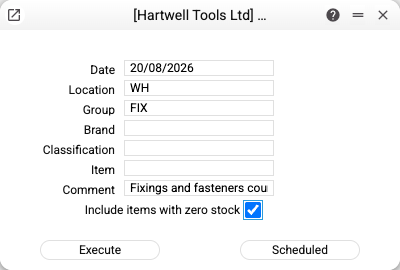
The selection is set by location, date, group, brand, classification or a specific item. So you can count one category instead of the whole warehouse — that is what a spot check is.
“Include items with zero stock” is the detail people remember only after counting. Leave it off and the worksheet holds only what the system already knows about. An item found on the shelf that the books have never heard of will have nowhere to go.
The routine can also be scheduled, if you count the warehouse every month.
Step 2. Enter the count
One line per item: the quantity you actually counted. The book quantity fills in by itself, in the next column.
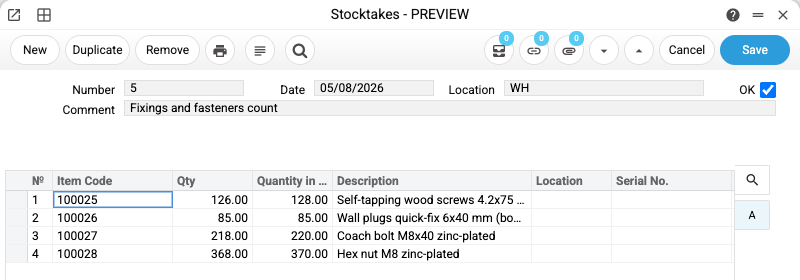
The difference is visible immediately, right in the line. Nothing to subtract in your head, no separate report to run — the picture builds as you type.
One document, one location. Counting several storage places means one worksheet each. Otherwise you cannot tell where the shortage actually is. How the stock accounting itself works is on a separate page: retail stock management software.
Step 3. Post it
Tick OK and save. The count is recorded, stock levels untouched.
Once posted, the worksheet becomes a document you can come back to: when someone asks six months later where the shortage came from, you have the date, the location and the list of items.
Step 4. See the difference
A separate report gives the summary: what the books say, what was counted, and the difference per line.
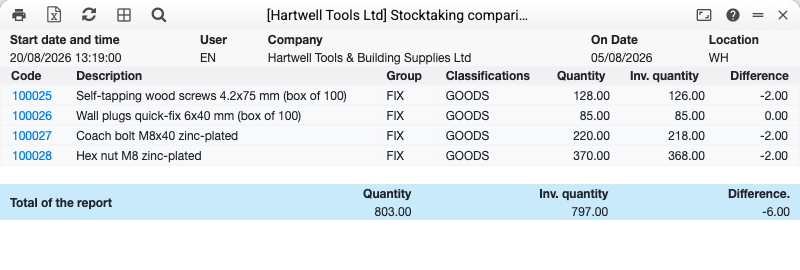
This is also where stock counts stop looking like theft investigations. A single count often shows a shortage on one item and a surplus on another — the usual cause is a mix-up between similar products during picking, not a missing box.
Step 5. Close the difference
The correcting documents are not typed by hand. A routine — stocktaking comparison — takes the posted worksheets for the period and creates what is needed: a goods receipt for surpluses and a stock write-off for shortages.
The documents link back to the count in both directions: from the worksheet you can see what closed it, and from the write-off you can see what it was based on.
⚠️ Worth checking by hand: the cost at which a surplus item enters stock. Your future profit on that item depends on that figure, and assuming the routine guessed correctly is not the same as looking at the document it created.
What if the shop stays open?
The question that comes up immediately: does trading have to stop for the count.
Technically, no. But there is a nuance to understand: the book quantity in the worksheet is calculated as of the document date. If shipments or transfers happened after the count date, today’s stock level will be different — and that is not a system error.
Hence a simple discipline: count as of a specific date and close the difference with documents of that same date. Then the picture adds up. If a week of active trading passes between the count and the correction, the gap will have to be explained by that week’s movements.
For a large warehouse, spot checks by group are more practical: hand tools today, safety equipment tomorrow. The shop keeps trading and each group is counted as of its own date.
Details about the tool itself are on the stock count software page.
Common situations
We posted the count and the stock level did not change. By design. The document records the count; a separate routine brings the books in line with reality, and it has to be run separately.
We found an item the books have never heard of. A normal case: a line with a book quantity of zero, and the routine will create the receipt for the surplus. The only requirement is that the item made it into the worksheet — which is what the zero-stock checkbox is for.
The book quantity does not match what stock shows right now. Check the document date; the column is calculated as of that date.
Nothing appeared in the transaction journal after posting. As expected: a stock count posts no entries. They will come from the documents that close the difference.
Frequently asked questions
Can I count part of the warehouse instead of all of it?
Yes. The worksheet selection is set by group, brand, classification or a specific item, so one category can be counted without touching the rest.
Do I need a barcode scanner?
No, quantities are entered line by line. A scanner speeds up finding the right item, but it is not a requirement.
What happens to a shortage?
It is written off — the routine creates a stock write-off document. The amount lands in expenses on that document’s date. Whether to recover the loss from the person responsible is not the system’s decision; that is your internal procedure.
How long does a stock count take for a small warehouse?
Building the worksheet takes seconds. After that it comes down to the physical count: as long as it takes to walk the shelves. Entering the results and closing the difference takes minutes.
Is there a trail afterwards?
Yes. The posted worksheet stays in the system with its date, location and item list, and the documents that closed the difference are linked to it in both directions — from a write-off you can see what it was based on.
Try ERPJS for free
Free plan with no time limit. Sign up →
Try ERPJS for your accounting
Inventory, finance and clients — in one system. Start with the free plan.
Start for free