Stock Count Software
Stocktaking is the task everyone postpones. Because everyone remembers the last time: the store closed for a day, staff counting and recounting, and by evening the numbers still don’t match — is it a real shortage, or did someone count the same box twice? Next year the story repeats, because between counts the records live a life of their own.
ERPJS is stock count software that turns the annual ordeal into a working routine. Partial counts by product group without stopping sales, a draft you can keep open for days, an automatic discrepancy report, and write-offs in a single document. Runs online; the free plan has no time limit.
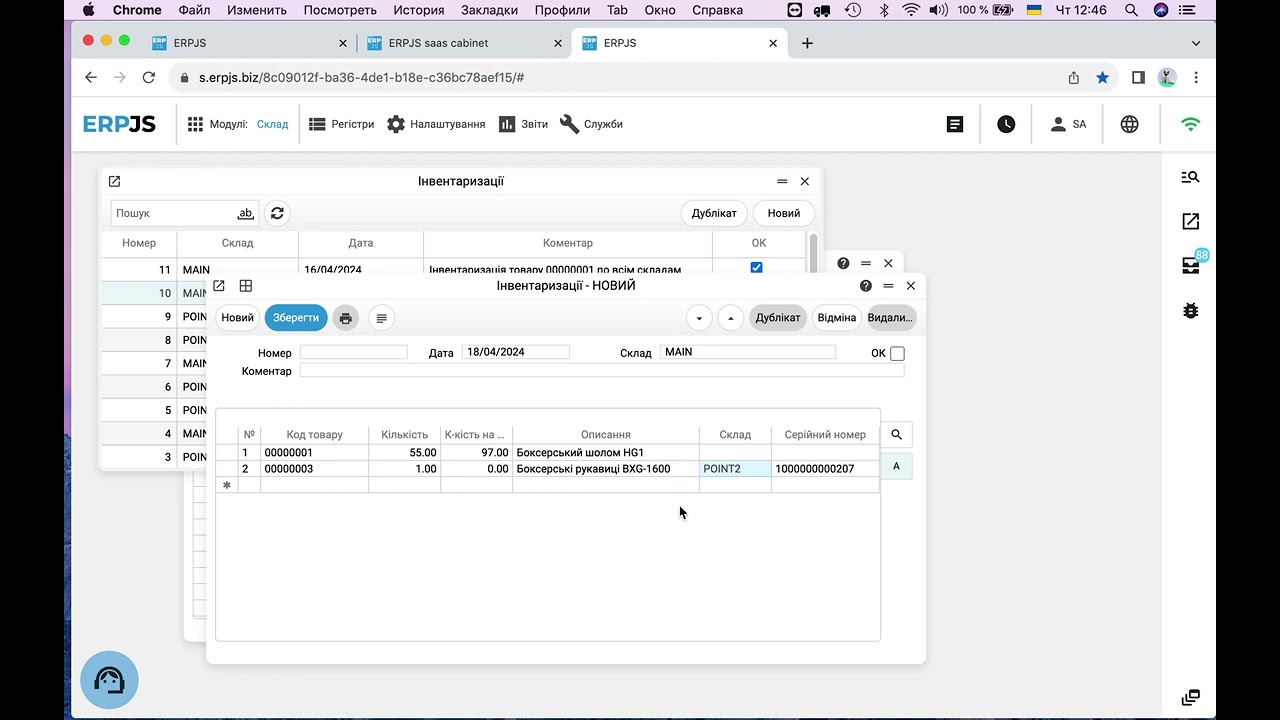
What the ERPJS stock count can do
Automatic discrepancy report
The system compares actual quantities against records and lists every discrepancy: what is short, what is over, and the value involved.
Partial counts
No need to count the whole warehouse. Pick a product group or specific items and verify just those — without stopping the business.
Draft mode for days
Fill the count document gradually: part today, more tomorrow — and confirm it once everything is checked.
How a stock count works in ERPJS
- Create a count document — choose the warehouse and the scope: everything, a product group, or selected items.
- Enter actual quantities — manually from a count sheet or with a barcode scanner, which speeds counting up several times. The document stays a draft until you finish.
- The system compares actual vs recorded — shortages, surpluses and values per item are visible immediately, with a dedicated comparison report.
- Post the result — shortages become a write-off, surpluses are booked back in. One document, and system stock matches the shelves again with cost recalculated correctly via FIFO.
Count part of the warehouse — keep selling
The main reason people hate stocktaking is the assumption that the store must stop. In ERPJS you can split the warehouse into groups and verify one group a week: drinks today, household goods next week, frozen the week after.
Within a month or two the whole warehouse has been covered with zero downtime, and discrepancies surface while they are still fresh — when you can actually reconstruct what happened. Small regular checks instead of one annual marathon: that is what working stock control looks like.
A stock count in ERPJS is not “close the store and count till midnight” — it is a regular check of selected groups while sales continue. The system finds discrepancies itself and posts them in one document.
Beyond the count: everyday warehouse automation
- Receipts, transfers, write-offs — every stock movement is a document that updates balances instantly.
- Barcodes and labels — print labels from the system, find items fast with a scanner during receiving and counting.
- Serial numbers — full history per unit for electronics and equipment, including warranty terms.
- Minimum stock levels — a report shows which items are running out and how much to reorder.
- Multiple warehouses — transfers in one document, balances visible per location and in total.
The full picture of stock features is on the inventory management software page.
Who is it for?
A good fit: retail stores and chains, wholesale and e-commerce warehouses, service centres with spare-parts stock, small manufacturing sites.
Not a fit: large logistics hubs that need bin-level (address) storage — that is a job for specialised WMS systems.
How to start — 3 steps
- Sign up — one minute on the registration page.
- Product list — import from a spreadsheet via CSV or enter manually.
- First count — enter actual quantities; they become the opening balances of honest stock records.
In fact, the first stock count is the fastest way to launch stock control: you count the warehouse and populate the system with real data at the same time.
FAQ
How long does a stock count take?
Depends on volume. With a barcode scanner counting goes 3–5 times faster than with a paper sheet, and partial group counts remove the need for a full-day count altogether.
Can I count without closing the store?
Yes. Pick a product group to verify — the rest of the warehouse keeps working. The document can stay in draft for several days and be confirmed when the check is done.
Can I count only part of the warehouse?
Yes, partial counting is a standard mode: choose a product group or specific items within a warehouse. Handy for regular spot checks of fast-moving items.
What happens to a shortage after the count?
The system produces a discrepancy report; you post the shortage as a write-off with FIFO cost calculated automatically. Surpluses are booked back in the same way — one document each.
Are serial numbers supported?
Yes. For serialised goods the count verifies specific units, not just quantities — you can see exactly which serial number is missing.
Is it free?
Yes, stock counts are included in the free plan with no time limit — together with the rest of stock control: receipts, transfers, write-offs and reports.
How to actually run a stock count — step by step, with screens for every step and the usual traps — is covered in a separate article: how to run a stock count.
Blog articles
- How to run a stock count: step by step, with the traps
- A working day in an accounting system: what you actually have to do
- A customer order: from the phone call to the shipment
- Free accounting software: what is actually free, and what you end up paying for
- An invoice for a client — in one sentence, without opening the app
- How a Store Owner Connected His Site to His Accounting System Without a Single Developer
- Sales Price: Calculate It From Cost, Don't Guess
- Fiscal Receipts Without a Separate Cash Register