It is month end, and I need to know who owes how much. Instead of three reports and a spreadsheet, I ask the Claude assistant one question in chat. It opens the ERPJS reports itself and lists the overdue invoices with the days overdue. Then it prepares reconciliation statements for the largest debtors and finally drafts reminders to them. Below is what happens at each step.
Usually this means several reports and a fair amount of manual work. First the unpaid invoices report, then debt aging to see who has been late the longest. Then a reconciliation statement for each customer and a letter to each one. The easiest place to make a mistake is the last step: one amount in the letter, another in the books.
The video is two minutes long and in Ukrainian. The chat is real, the answers are not scripted, and the data is a demo database of a tool store (amounts in Ukrainian hryvnias, UAH).
What I ask, and what the assistant answers
I ask in plain words: “Who owes me as of today? Show the overdue invoices and how many days overdue.”
Before every action in the system, the assistant shows it and waits for permission: “open such-and-such report”. I allow it, and it goes into the ERPJS reports on its own. I did not have to know what the reports are called or where they are.
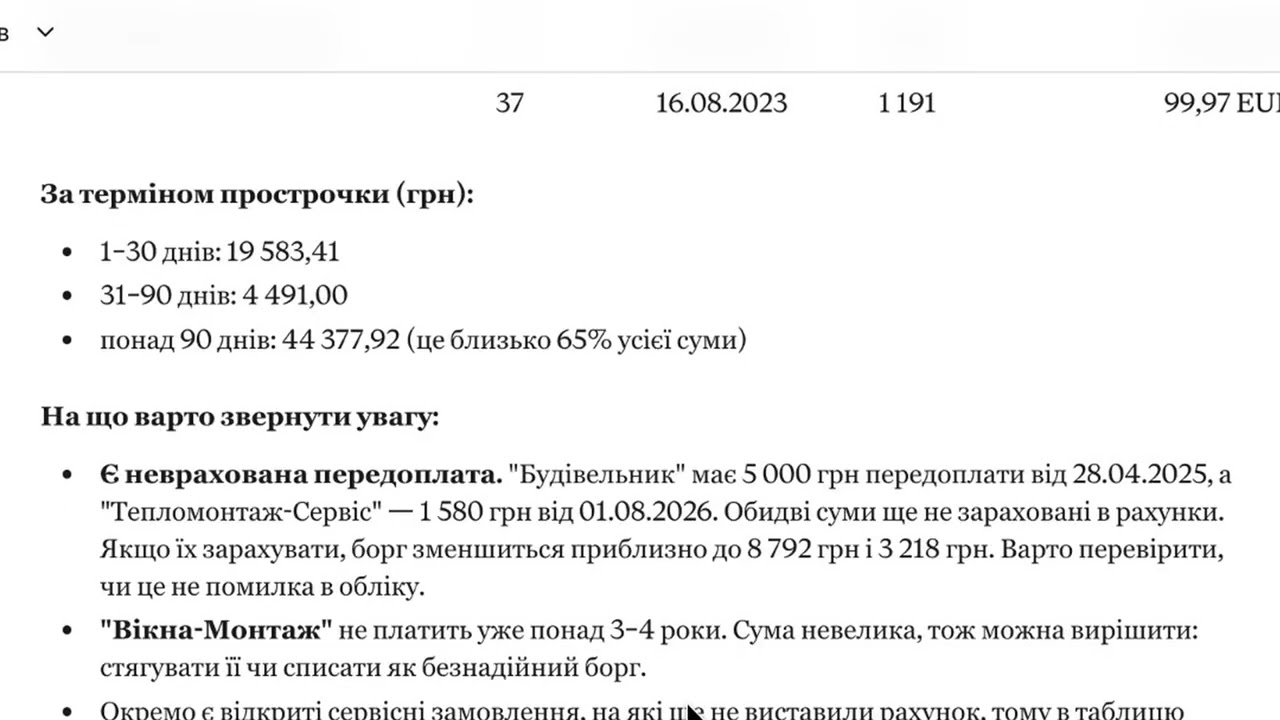
The answer: nine customers and twenty-one overdue invoices, each with a date and an amount. The debt is broken down by age: over ninety days — UAH 44,377.92, about two thirds of the total. The assistant counts days overdue from the invoice due date, not from the invoice date. That is the right way, and it says so itself.
And below that, things I did not ask about:
- an unapplied prepayment: two customers paid in advance (UAH 5,000 and 1,580), but the money is not applied to their invoices. So the debt in the report is higher than it really is, and it is worth checking for a bookkeeping error;
- an old debt: a customer who has not paid for several years. The assistant asks directly: collect or write it off as bad debt;
- service orders without an invoice: the work is done, no invoice was issued, so this money never even reached receivables.
Bookkeeping errors that an ordinary report does not highlight are the most valuable part of the answer.
Can these numbers be trusted
I check in the system itself: Reports → the unpaid invoices report → run. The largest debtor, “Maister-Grup”: the same three invoices and the same UAH 18,618 as in the chat.
The assistant does not do the math “in its head”. It runs the same reports you open in the window and cites them in the answer. Its permissions are those of the user it is connected as: whatever that user cannot see, the assistant cannot see either.
Reconciliation statements in one request
The second request: “Prepare reconciliation statements with the three largest debtors and give me the files.”
The assistant uses the ERPJS report for reconciliation statements. The period starts at the beginning of the year; the balance on January 1 goes into the statement as the opening balance. Again, every step needs my confirmation.
The result is six files: each statement as a PDF to send and as Excel in case something needs editing. This is the standard ERPJS form, one page per customer. The assistant re-added the lines itself: the turnover in each statement matches its totals, and the balances match the amounts in the overdue report. Each file opens right in the chat or can be downloaded.
The assistant writes the reminders, you send them
The last request: “Write each of the three a short reminder: amount, invoice numbers, the day the payment became overdue.”
A separate letter for each customer: a subject line with the amount, the invoice number and date, the day the delay started, and a request to pay or name a payment date. The reconciliation statement is attached with a request to sign it or send comments.
Whether to send is my decision: the assistant only writes the text, it does not send letters.
One more warning from it. In one letter the prepayment is already taken into account, but in ERPJS the offset has not been posted yet. Unless it is posted, the debt in the report stays at the old amount, not the one in the letter. In other words, the assistant caught a mismatch between the letter and the books before the letter reached the customer.
What the assistant does itself, and what you decide
- By itself: opens reports, calculates, cross-checks, prepares files and texts.
- With your permission: it shows every action in the system before carrying it out.
- Only you: send the letters and decide what to do with the old debt and the prepayment.
In this video the assistant changed nothing in the books, it only read and calculated. But it can do more: create documents, correct them, approve them (“OK”) and reverse the approval. The rules are the same as in the window; for example, a paid document cannot be un-approved. That is the next video: the assistant finds what is running short in the warehouse and creates purchase orders.
How to connect Claude or ChatGPT to ERPJS, step by step, is on the AI chat accounting page. It is worth creating a separate user for the assistant: one user cannot work in the window and through the chat at the same time.
Read also: An invoice for a client — in one sentence, without opening the app; Asked which weekday earns most — and found a hole in sales; The same three documents every month — now in one message.
Frequently asked questions
Can the assistant send a letter to a debtor by itself?
No. It prepares the text, and you send it — by email, messenger or however you usually do. Sending letters is not among its actions in ERPJS.
Where does the assistant get its numbers?
From ERPJS reports, the same ones you see in the window: unpaid invoices, accounts receivable aging, reconciliation statement. If in doubt, run the same report and compare: in the video the amounts matched to the cent.
What does a reconciliation statement look like?
The standard ERPJS form: a PDF to send to the customer and Excel in case something needs editing. The assistant states the period in its answer (in the video, from the start of the year); if you need another one, just tell it.
Does the assistant see everything in my books?
Only what is allowed for the user it is connected as: an accountant’s assistant sees accounting, a sales manager’s assistant sees sales.
Does it only read, or can it change things?
It can change things: create documents, correct them, approve them and reverse the approval, by the same rules as in the window. It shows every such action first and waits for your permission.
How much does it cost?
The connection is available on the free ERPJS plan too. What you need on the Claude or ChatGPT side is described on the AI chat accounting page.
Try ERPJS for your accounting
Inventory, finance and clients — in one system. Start with the free plan.
Start for free