The most common answer we get is not “too expensive” and not “we don’t need it”. It is this: “it looks complicated, and I have no time to figure it out”.
That objection is fair. Behind it sits a picture: an accounting system is a six-month study project, full of reference books, settings, and an accountant who is the only person who understands what is going on in there.
So this text is not about features. It is literally one working day of a small trading company: what a person opens, what they click, and how long it takes. No “potentially”, no “can be configured”.
Morning: the stock arrives
Nine o’clock, a delivery shows up. The old way: the supplier’s note goes into a folder, someone later retypes the lines into a spreadsheet, someone else separately updates the prices.
In the system this is one document — a goods receipt. It holds the supplier, the date, the list of what arrived, quantities and purchase prices.
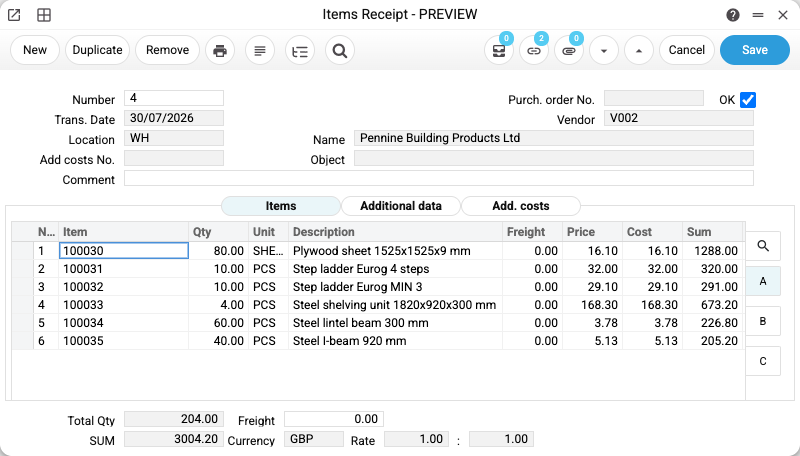
What happens at that exact moment, with no extra action: the stock level goes up, and the cost of each item is recorded. Not “somewhere in a report” — this is the figure the system will later use to calculate your margin when the item sells.
If the delivery carries freight or customs charges, they go into the same document. Then the cost is the real landed cost, not just “what we paid for the goods”. We covered that separately — product cost: what to include and what to leave out.
Barcode labels are printed straight from the receipt, for the items that need them.
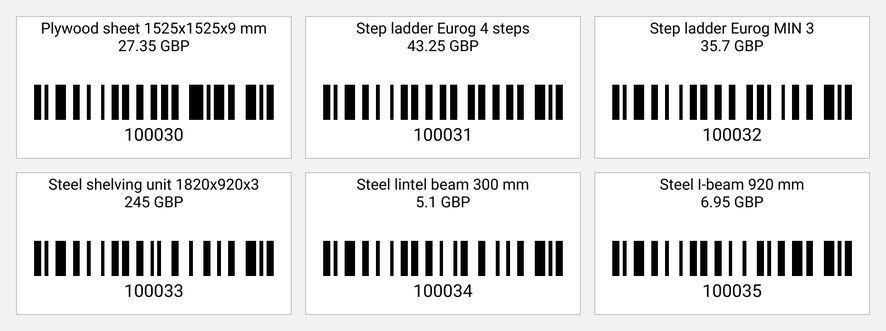
How long it takes. About as long as typing the delivery note into a spreadsheet, which you do anyway. The difference: after the spreadsheet you still have to update stock separately and work out cost separately. Here it already happened.
Midday: the sale
Now the part everything else exists for.
A retail sale looks like a till: product tiles, price, quantity, discount. Items are found by search or by scanner.
The customer gets a receipt. Where fiscal receipts are required, the sale goes to the tax authority through a fiscalisation service — which one depends on your country’s rules. Where they are not, a plain sales receipt is printed.
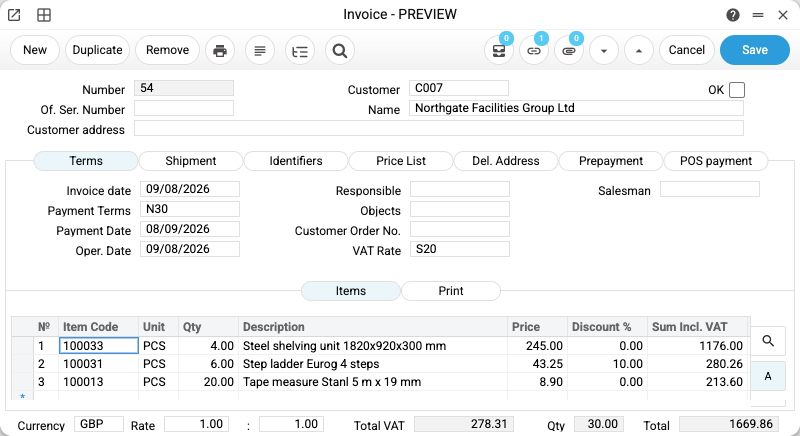
Wholesale works differently: first a customer order, then a shipment, then an invoice. Each document grows out of the previous one, so nothing is retyped. There is a separate piece on that: a customer order from the phone call to the shipment.
Again, things happen on their own: stock is written off, revenue is recorded, profit is calculated line by line.
How long it takes. The sale itself — seconds. The real saving comes in the evening.
Evening: how much did we make
This is where the gap with spreadsheets becomes uncomfortably obvious.
“How much did I make today” usually gets one of two answers from a notebook or a spreadsheet: “this much cash is in the till” and “this much was sold”. Both are wrong. Cash is not profit; revenue minus cost is closer, but only if somebody actually calculated the cost.
In the system, the end of the day is a report: sales for the period, best and worst performers, margin per product.
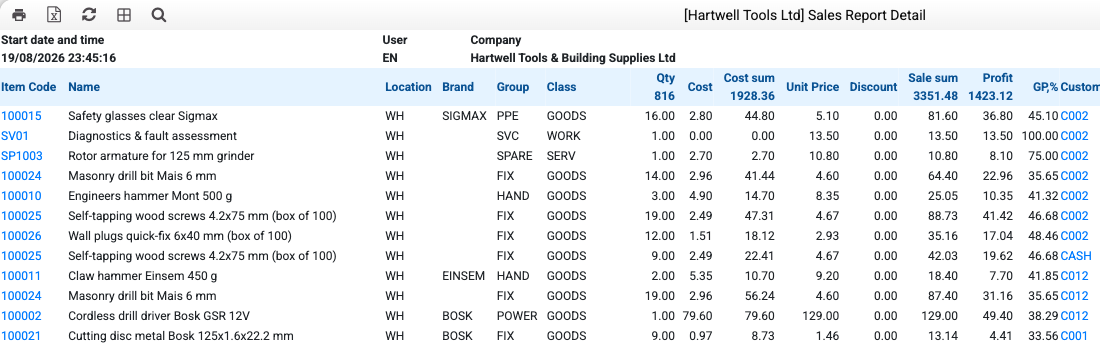
In the demo shop’s July that reads as follows: safety glasses returned a 45% gross margin and self-tapping screws 47%, while a cordless drill driver — the most expensive item on the list — returned 38%. Diagnostics shows 100%: it is a service, so there is no cost of goods. You see not “we sold this much”, but where the money actually came from.
The second level, for the owner, is the financial report: revenue, cost of sales, gross profit, expenses, operating result. July net revenue £3,351.47, cost of goods sold £1,896.56, gross profit £1,454.91, and £1,427.75 of operating profit after expenses.
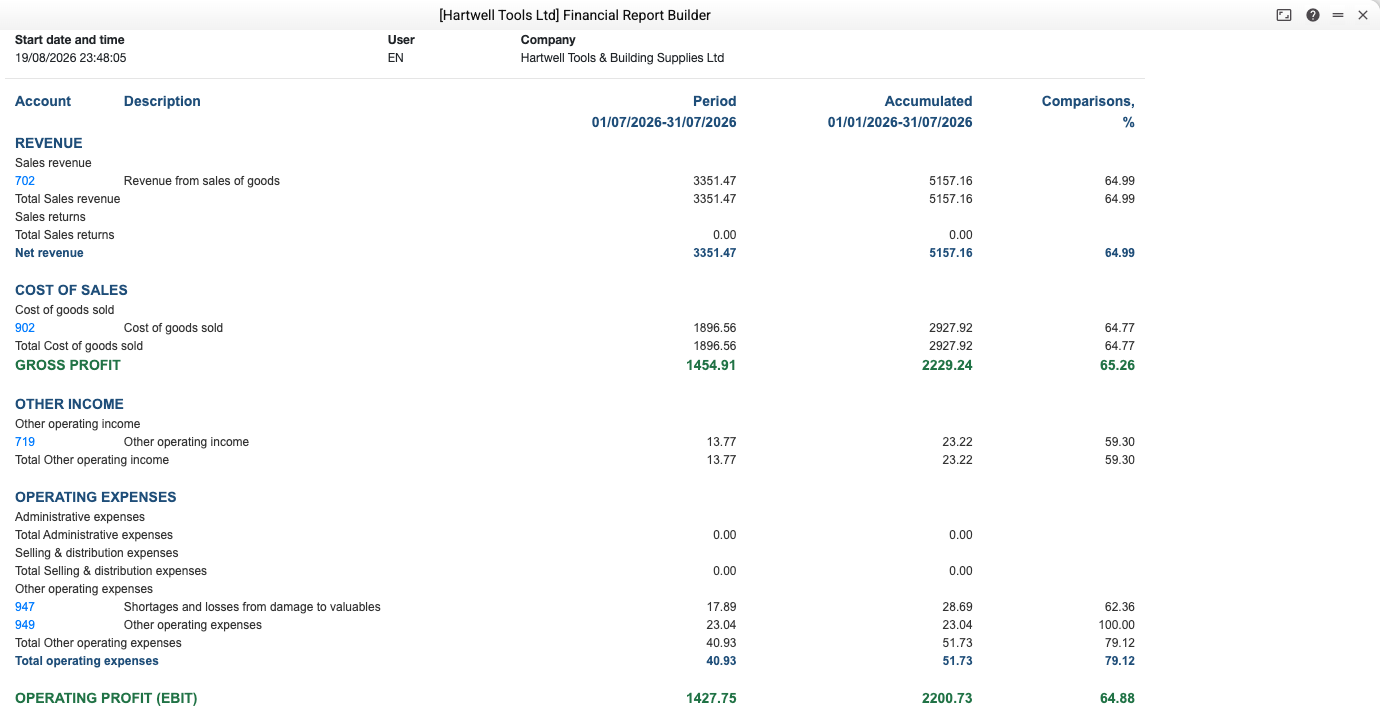
One honest note: this is not a single built-in “profit” button. It is a financial report builder, where the report is assembled around your own chart of expense lines. Build it once and it simply refreshes with new data. That is both more honest and more useful — every business has its own cost structure.
How long it takes. Opening the report — seconds. Working the same numbers out by hand in a spreadsheet — an evening, with mistakes.
*The screens come from a demo database of a small UK tool and building supplies merchant, not from a real client.*
What you do NOT do every day
This section matters more than the previous three, because it is the one that breaks the “complicated” picture.
You do not maintain reference data daily. Customers and products are entered once, then picked from a list. New items are added as you go, in a minute.
You do not post journal entries. The system generates the accounting entries from the documents. If you are not an accountant, you never see them.
You do not reconcile stock. Documents move it. A stock count is periodic, not daily.
You do not configure the system. Configuration is a starting task: warehouses, tills, tax rates, pricing. After that you simply use it.
So a working day is three familiar actions you already perform: receive, sell, check the result. Only instead of three separate places where all of it lives, there is one.
What if even that sounds like too much?
There is a path where you never open the software at all. Your accounting data connects to an AI chat, and you ask in plain words: “how much did I make in July”, “invoice this customer”, “what is left in stock”. The answer comes from your own data, not from the internet.
This is not a separate product and not a replacement for the system — it is a second door into the same documents. We showed on video what a financial manager looks like when it runs in that chat: your accounting in an AI chat.
It suits exactly the people whose “it’s complicated” is about the interface. Asking in words is easier than hunting for the right window.
What if I click the wrong thing?
The question that follows “it’s complicated” more often than any other.
A document that has not been posted can be corrected. A posted one can be corrected too, but the system records who did it and when — every document keeps a change history. This is not idiot-proofing; it is a normal working situation, because everyone makes mistakes.
Not spotting the mistake is worse than making it. That is exactly what lists and reports are for: a discrepancy shows up immediately instead of a quarter later.
Frequently asked questions
How long does it take to start working in an accounting system?
To make the first sale — an hour. For the reports to mean anything, you need to enter your stock balances and customer list; for a small company that is one or two days of work.
Do I need an accountant to run accounting in the system?
Not for day-to-day work. Receiving stock, selling and reading a report can be done by anyone. An accountant is needed for statutory reporting, and the system makes that easier because the data is already collected.
What if I work alone and have no time for any of this?
Then there is even less to do daily: you have supplier deliveries and sales either way. The only question is where you write them down — in a notebook that calculates nothing, or in a system that calculates by itself.
Can I work from a phone?
Yes, there is a mobile version — lists, stock levels, documents. The full set of functions is more comfortable on a computer, but checking stock or making a sale works from a phone.
What does it cost to start?
There is a free plan — one user and 512 MB of data, with no functionality removed. For a sole trader or a very small company that lasts a long time.
Try ERPJS for free
Free plan with no time limit. Sign up →
Try ERPJS for your accounting
Inventory, finance and clients — in one system. Start with the free plan.
Start for free