ERP for Manufacturing — Production Accounting Software
Production runs, but your accounting is a fog? How much raw material actually went into a batch, what a product really costs, which operation an order is stuck on and how much a customer still owes — without production accounting these questions go unanswered, and decisions have to be made blind.
Production accounting is the systematic control of everything that happens on the shop floor: how much material is written off, how much product is output and what it cost to make. ERPJS production accounting software connects raw material stock, tech cards, shop-floor operations, customer orders and finance into one picture. Below — what gets tracked, how it works and which reports you get.
What is production accounting and why do you need it?
Production accounting is the recording of raw material, labour and finished goods movement across all stages of manufacturing. It answers the owner’s key questions: how much it costs to produce a unit, whether there are enough materials for the plan, and where the business loses money.
Without accounting, production relies on a foreman’s intuition and cost is calculated “roughly”. Systematic accounting replaces guesswork with facts: every batch has a precise cost, every material write-off is recorded, every order can be assessed for profitability.
What does production accounting software track?
Full production accounting covers four areas:
Orders and output
How much product needs to be made, what's already launched and what's completed. The status of every order — from launch to finished goods in stock.
Materials and write-offs
How much raw material is written off to production per the tech card norms. Material balances update in real time.
Cost
The actual cost of every product: materials plus labour. Calculated automatically when an order is completed.
Operations and equipment
The sequence of operations, the equipment on each and the volume actually done. You see where the process stalls.
How is production accounting done in ERPJS?
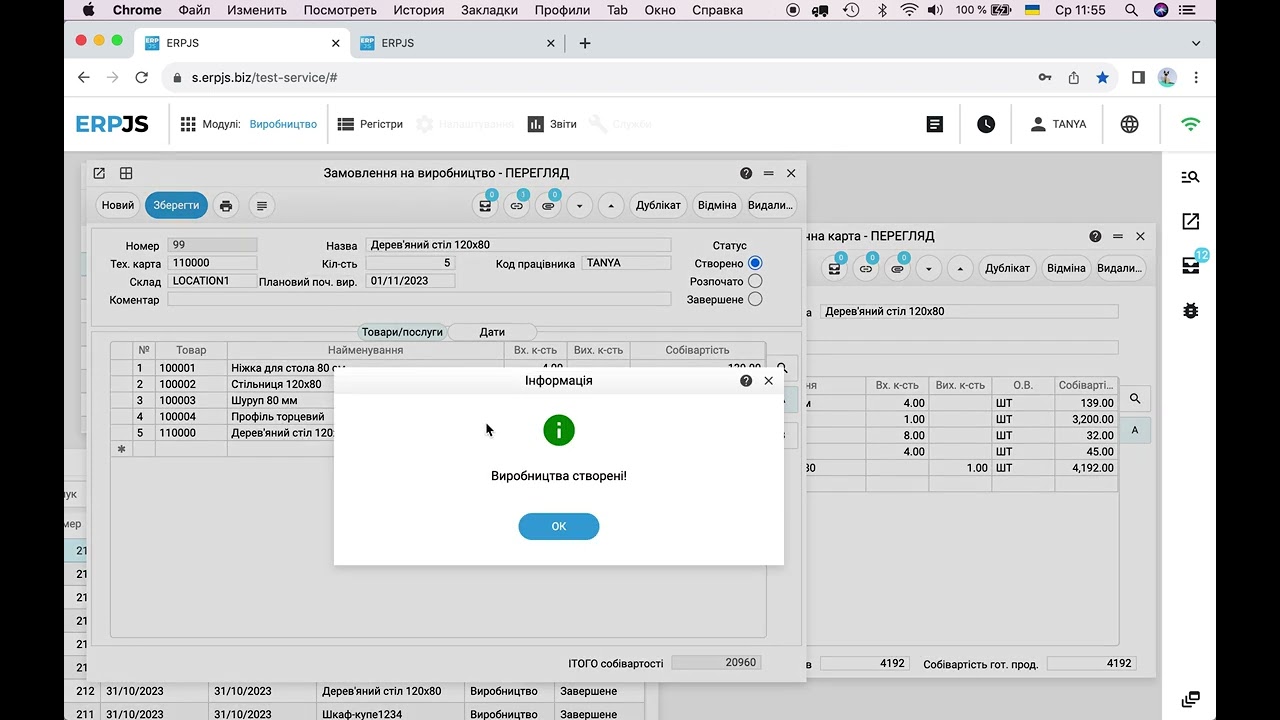
In ERPJS production accounting is built around the tech card (bill of materials) and the production order:
- The tech card defines what a product is made of and how: materials and consumption norms, operations, equipment.
- The order launches production of the required quantity — the system calculates the raw material requirement.
- Launch and completion automatically write off materials from stock and receive finished goods with the calculated cost.
All financial accounting entries are created automatically — production accounting doesn’t exist on its own but is connected to stock and finance. How to build the tech card everything starts from — on the Production Tech Cards page.
Production accounting in ERPJS shows the economics of the shop floor, not just balances: the actual cost of every batch, raw material requirements, plan and fact by operation. Everything is connected to stock and finance — with no spreadsheet reconciliation at month-end.
Materials accounting: balances, write-offs, requirements for the plan
Materials are the biggest cost item in manufacturing. When raw materials are counted by eye, a shortage shows up only once the shop has stopped, and excess purchases freeze cash. The software covers the whole path of raw material — from receipt into stock to write-off into production:
- Receipt. Raw material is received into stock at the purchase price, which forms the actual cost of the material.
- Real-time balances. The quantity of every material is visible without reconciling spreadsheets. You can run several stores — main warehouse, shop floor, a separate section; transfers between them are recorded with a document.
- Write-off by tech card. When a production order is launched, materials are written off automatically per the tech card norms — you see how much went into each batch.
- Requirements and shortages. The system takes the norms from the tech card, multiplies them by the quantities in production orders and compares the result with stock. The output is a list of what and how much to buy to complete the plan without stoppages.
This removes both extremes: a shortage that stops production mid-order, and overstock that keeps money tied up in surplus raw material.
Operations, job tickets and defects: what happens on the shop floor
Not every product is made in a single step. When a product goes through several operations and more than one person works on it, “order in progress” no longer tells you anything — you need to see what exactly is done, on which equipment and with what result:
- Job tickets from the tech card. Operations aren’t entered by hand: when an order is launched, the system unfolds the tech card into job tickets in the sequence defined in it. Cutting won’t start after assembly, and painting won’t get lost in between.
- Equipment per operation. A machine or a group of machines is attached to an operation — useful for shops with several work centres.
- Plan and fact. In every operation the standard quantity sits next to the quantity actually done. An operation where the fact keeps falling short of the standard is the bottleneck that breaks your deadlines.
- Defects and their cause. Not just how much was spoiled, but why: material, machine setup, a mistake at the previous stage. After a few months these are no longer isolated cases but a picture of where the money leaks.
- Semi-finished goods. A product can be built from intermediate items you make yourself — they are tracked as separate positions with their own cost.
- Subcontracting. Plating, powder coating, laser cutting — small manufacturers often send these out. Such an operation can be marked as external: it stays in the product’s route, and a subcontractor does it.
The difference between “order in progress” and operation-level accounting is the difference between “something is being done” and “cutting is finished, painting is waiting for the machine, three parts were scrapped because of the material”.
Customer orders: from the first call to shipment
A customer calls to ask when their order will be ready — and the manager walks to the shop floor to find out. In ERPJS customer work lives in the same system as production, so a customer order is linked to the production order:
- Quote. Based on the product’s tech card: the cost is known, so the price is built from it with the markup you need, not guessed.
- Customer order. What you promised, in what quantity, at what price and by when. For a regular customer the system applies their price or discount automatically.
- Production order. Launches the shop floor for this order. The manager sees the production stage on the order card instead of calling the foreman.
- Shipment. A delivery note is issued straight from the order.
- Payment and debt. How much a customer owes, on which invoices and how many days overdue — without reconciling spreadsheets.
Accounting comes first and customer work complements it: the manager sees which stage the shop is at, the shop sees who it’s working for, and the owner sees whether every order was profitable.
Which reports does production accounting give you?
The point of accounting is the reports you base decisions on. Production accounting in the system gives the owner several key views:
- Cost per product. What it actually cost to make a unit and a batch — the basis for pricing and profitability assessment.
- Raw material balances and shortages. How much material is in stock and how much to buy for current orders so production doesn’t stop.
- Finished goods movement. How much was output, how much is in stock, how much shipped.
- Customer debts. Who owes how much, on which documents and how many days overdue.
It’s exactly these reports that set accounting apart from a plain “warehouse”: you see not just balances but the economics of production. How to calculate cost correctly without including the wrong things — in the article Cost of Goods: What to Count and What Not To.
Why is software accounting better than Excel and manual records?
In Excel production accounting is a set of separate tables that have to be reconciled by hand and go stale after every price change. Raw material balances almost never match reality: write-offs are entered late or forgotten, and a shortage is noticed when it’s too late. There’s no link between material write-offs, product output and finance, so cost is always approximate.
In software, accounting runs on its own: write-offs and receipts create entries automatically, balances update with every movement, cost is recalculated from the facts, and reports are built in one click. More on automation in the article Production accounting: how to automate from raw materials to finished goods.
Which manufacturers is it for?
Production accounting in ERPJS is designed for small and medium businesses that make products from materials — including make-to-order work for regular customers:
- Furniture and woodworking
- Garment and textile
- Food and confectionery
- Metalworking and assembly
- Advertising production and printing
- Windows, doors and structures
If a product is made in one step by one person, you can skip operation-level accounting — tech cards, orders and cost are enough.
Frequently asked questions
What is production accounting in simple terms?
It’s the systematic recording of how much raw material was used, how much product was output and what it cost to make. Production accounting answers questions about cost, material requirements and order profitability.
How is production accounting different from inventory accounting?
Inventory accounting shows balances of goods and materials. Production accounting adds the economics: how much raw material went into making, what the cost of finished goods is, which operation is holding things up. It connects stock, production operations and finance.
How is cost calculated in production accounting software?
Automatically when an order is completed: materials actually written off per the tech card plus labour. This is the actual cost, not an estimate. General and administrative expenses are not included — they are accounted for separately in the profit and loss statement.
How does the software calculate raw material requirements?
The system takes consumption norms from the tech card, multiplies them by the quantities in production orders and compares the result with stock. The output is a list of what and how much you need to buy to complete the plan.
Do job tickets have to be entered by hand?
No. Operations unfold from the tech card when a production order is launched, in the sequence defined in the card. A machine or a group of machines can be attached to an operation.
How are defects recorded?
The quantity and the cause of defects are recorded in the operation. That gives you not just a loss figure but an understanding of why the losses happen.
Can I see which stage a customer order is at?
Yes. The customer order is linked to the production order, so its card shows the status: created, in progress, completed, shipped.
Is production accounting suitable for a small business?
Yes. The system is designed for small and medium manufacturing — workshops, ateliers, small plants. You can start on the free plan with no time limit: one user and 512 MB of data, with no features cut.