A client asks for an invoice. You type one sentence — “Create an invoice: this customer, HP printer, 10 units — and show me the current exchange rates in the system” — in the same chat where you ask for recipes and draft emails. Half a minute later the invoice is in your books and the chat shows the rates. You never opened the app.
This is not a concept or a “someday” promise. These are screenshots of ERPJS actually working inside the ChatGPT and Claude desktop apps — the ones anyone can install on any computer.
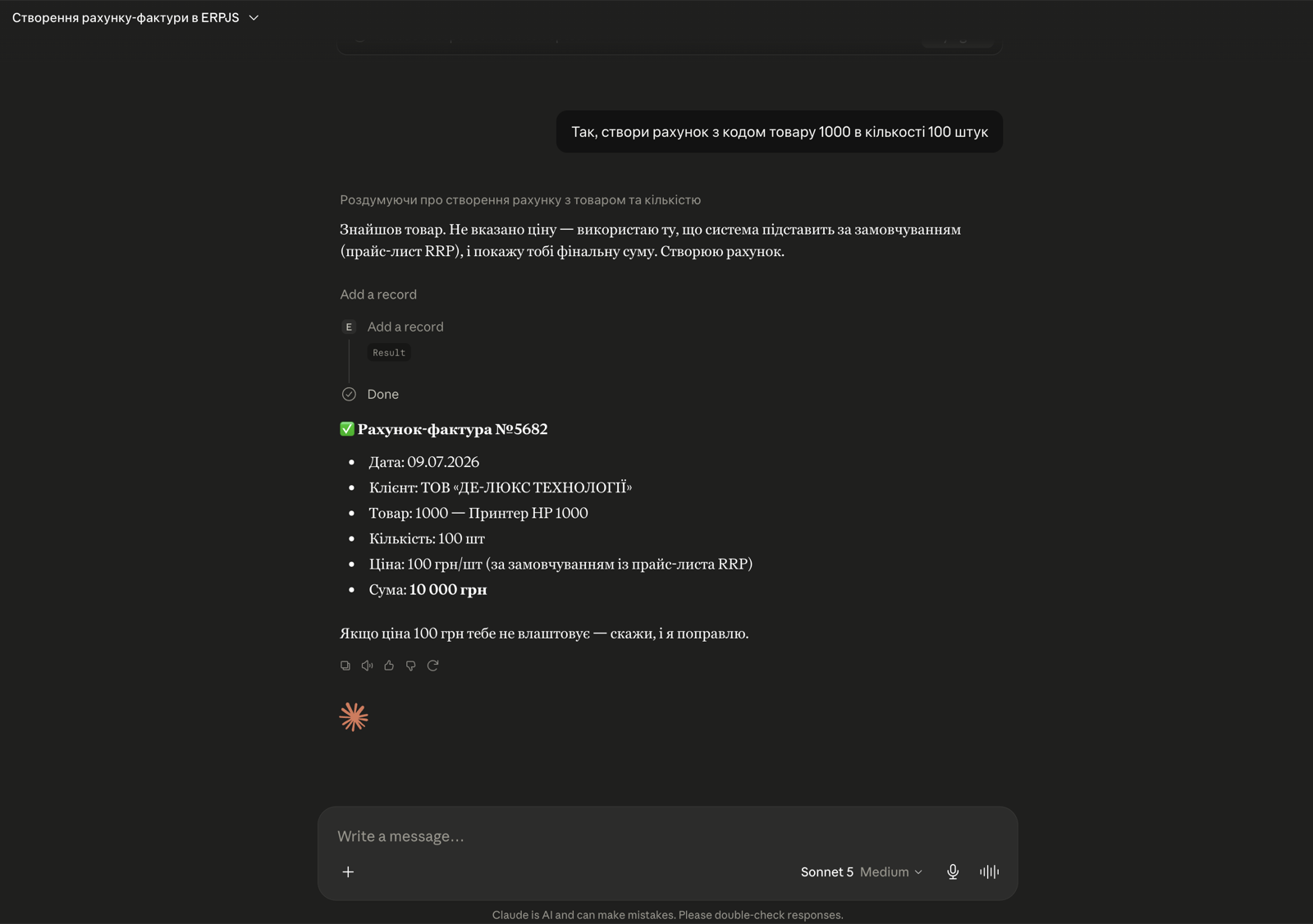
What happened
ERPJS now connects to ordinary AI chats. Not to special “agent systems”, not to developer tools — to the apps half of business owners already have on their computers.
Technically it works through an open interface (called MCP) — the same one from our case study about a store owner who linked his website to his accounting by himself. But where he built an integration, here there is nothing to build: connect once and work.
The point: the entry barrier is gone
Our previous AI case studies had a hidden barrier. The agent created documents — but through a separate tool. A client built an integration — but the agent had been set up for him. The reader thought: “Cool, but that’s not for me.”
Now there is no barrier:
- In Claude, connecting your own system is available even on the free plan — one custom connection is allowed, and one is exactly what a business needs: its accounting.
- In ChatGPT — it works too: we will guide you through the details for your plan when you connect.
- No developer needed. Setup is two fields in a dialog: a name and an address. Once — and forever.
What working with it looks like
Like ordinary messaging. You write in plain language — the system acts:
- “Create an invoice for 10 printers for customer N” — the invoice is created, with a number, date and total;
- “What are the latest exchange rates in the system?” — a table: USD, EUR, GBP;
- “How much stock is left in the warehouse?” — actual balances from the records, not from memory.
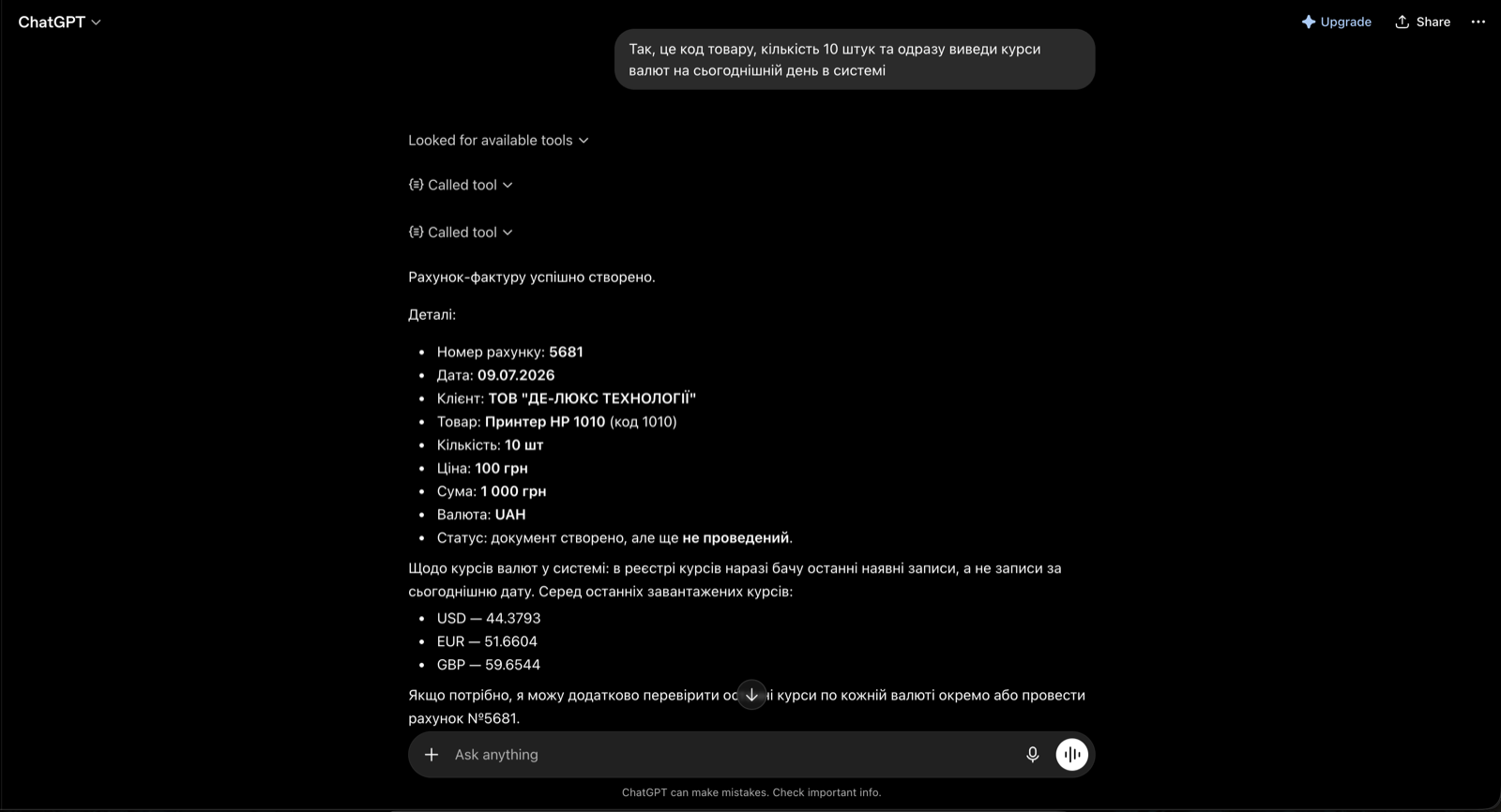
One detail we particularly liked (you can spot it in the screenshot): when the assistant was asked for exchange rates, it noticed by itself that the records in the system were not from today and suggested updating them. It is not a blind executor — it sees the state of your records and points out what deserves attention.
As much control as you want
Documents from the chat arrive in the system as drafts — with an “unposted” status. A handy option while you are getting started: review every document before posting until the assistant earns your trust, then simply post right away. AI prepares the documents; how much control you keep is up to you.
The connection works only through your access to your own system: the chat sees exactly what your ERPJS account is allowed to see.
How to connect
In Claude (desktop app or claude.ai) — three steps:
- Settings → Connectors → Add custom connector;
- enter a name (say, “My ERPJS books”) and the connection address;
- click Add. Done — new chats can see your accounting.
In ChatGPT — slightly longer: Settings → Apps → Advanced settings → Create app → a name, the server address and the authentication method. The new app then shows up in your Apps list — and ERPJS is available in your chats.
The connection address is the same for everyone and setup takes two minutes — here is the step-by-step video guide.
Why it matters
We have been opening ERPJS to AI step by step: first an agent analysed data, then it created documents, then a client built his own website integration. Now the next step: accounting arrives in the app you already use every day.
For a small business it means one simple thing: between “I need to issue an invoice” and a ready invoice there is a single chat message. No new software to learn. No developer. No automation budget.
FAQ
Do I need a developer to connect ERPJS to ChatGPT or Claude?
No. In Claude it takes three steps right in the app — a name and an address. In ChatGPT it is done once in the Apps section of the settings. About two minutes.
Which ChatGPT or Claude plan do I need?
In Claude, custom connections are available even on the free plan (one external service — exactly your accounting). In ChatGPT it depends on your plan — we will advise you when you connect.
Is it safe to give a chat access to my books?
The chat works through your access to your own system and sees exactly what your account permits. And documents arrive as drafts — so you can always review them before posting if you wish.
What can I do with my accounting through the chat?
Create documents (invoices, orders), look up data (stock, exchange rates, customer details) and ask questions about the business in plain language. One message can carry several actions at once — say, create an invoice and show the rates.
What if the AI gets something wrong in a document?
Nothing irreversible: the document enters the system as “unposted”, so a fix takes seconds and affects nothing. Whether to review every document or post right away is up to you.
Does it work only on a computer?
The connection is set up once per account — after that your accounting is available in the chat wherever you use it: the desktop app or the browser.
Try ERPJS for your accounting
Inventory, finance and clients — in one system. Start with the free plan.
Start for free